Two things here do not line up. People search for how to take a selfie holding their ID for Binance in fairly large numbers, and the website verification flow has no screen that asks for one. Both of those are true at the same time, and the gap between them is where the trouble lives, because somebody is asking for that photograph, and it is not the verification page.
What the flow actually asks for
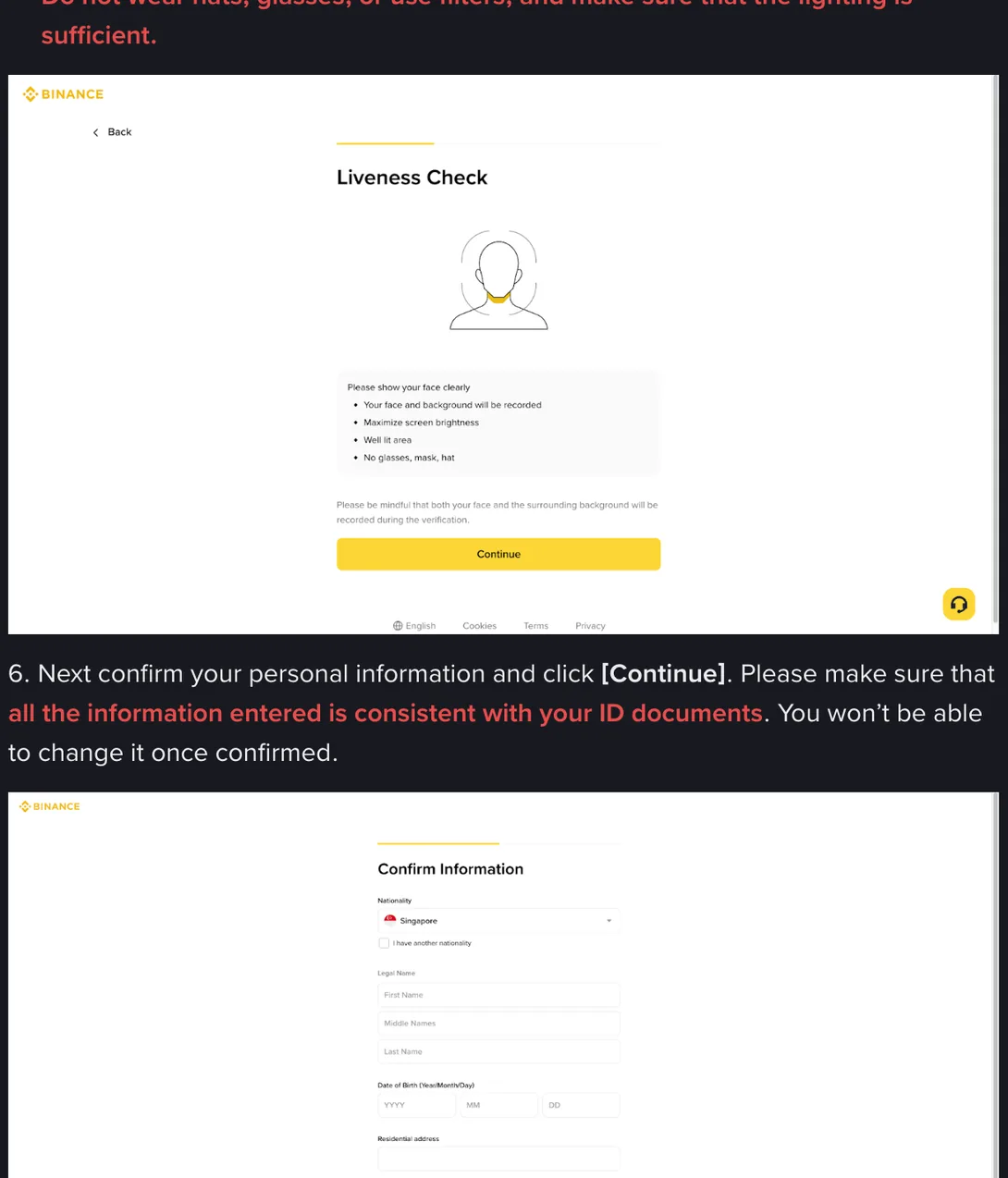
The face step is called Liveness Check, and on the identity verification help page the instructions printed on it are short:
Please show your face clearly
Your face and background will be recorded
Maximize screen brightness
Well lit area
No glasses, mask, hat
Underneath, the same screen adds a line about what is being captured:
Please be mindful that both your face and the surrounding background will be recorded during the verification.
Recorded, not photographed. That word is the whole difference. What the step produces is a short recording of you responding to prompts, generated in that session and useless in any other. A still photograph, by contrast, can be sent anywhere for the rest of your life.
The document was dealt with two screens earlier, on its own, and it never meets your face in the same frame.
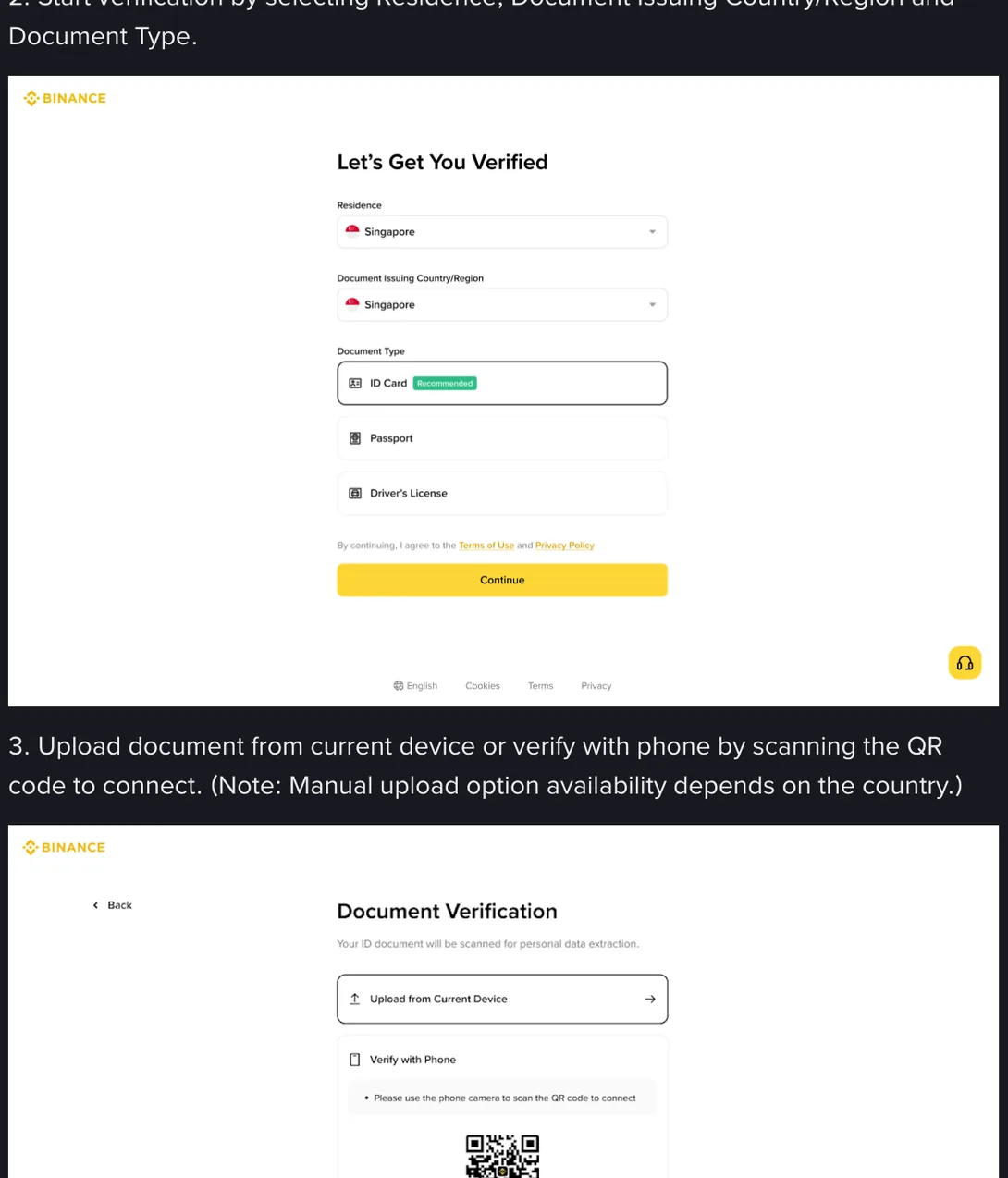
After the liveness step comes the confirmation screen, where the instruction is about typing rather than photography, and it carries the sentence people underline for a different reason: make sure that all the information entered is consistent with your ID documents, and you won’t be able to change it once confirmed.
So the sequence is document, face, confirm. No screen combines the first two.
The limits of that statement, stated plainly, because they matter more than the statement: this is the website flow, read on Binance’s English help page in September 2026. The mobile app may lay the same steps out differently, and regional variants were not checked screen by screen. Flows also get rebuilt. What this section establishes is that the standard route does not produce a photograph of your face beside your card, not that no such request could ever exist anywhere.
Then why is everybody searching for it?
Because plenty of other places genuinely do ask for one, and the habit travels.
Banks ask for it when an account is opened remotely. Peer-to-peer trading counterparties ask for it before releasing funds. Lending apps, ticketing platforms, marketplaces and some account-recovery procedures ask for it, often with a handwritten note added to the frame carrying today’s date and the name of the service. Anyone who has done any of that arrives at a crypto verification page expecting the same request, and when it does not come, assumes they have missed a step.
It is worth understanding what that photograph is for, because it explains why it is worth so much to the wrong people. Front and back images prove a document exists. A photograph of you holding it proves something else entirely: that the owner of the document was present, at a particular moment, and consented to this. That second thing is precisely what is missing when somebody wants to open an account in your name.
Three properties make the handheld photo worse than the two document images combined. Your face and the document are already composited, so nobody has to fake that step. It is static, which means it can be reused without limit, while a liveness recording answers prompts chosen at the time and works exactly once. And the handwritten note that is supposed to restrict its use is the easiest part of the image to change.
The request that arrives in a chat window
Set the legitimate platforms aside. There is a second population asking for this photograph, and it is far larger.
The pattern is consistent enough to recognise from the first message. It starts with something you said in the open: a complaint under an exchange’s post, a line in a Telegram group about a withdrawal that has not moved. A reply arrives from an account using the platform’s name and logo. It is sympathetic and it moves fast. Within a few exchanges you are asked for your registered email, then a screen share, then the code that just arrived on your phone, then a photograph of yourself holding your document beside a note with the date on it.
None of that is a procedure. Verification steps happen inside the flow, on the platform’s own pages, started by you from the account menu. Nothing in the sequence described above happens in a chat window someone else opened with you, and there is no legitimate reason for another human being to need a code that was sent to your phone. The one exception runs the other way round: a security appeal you started yourself from the official website or app, such as a 2FA reset, where support in a chat you opened there asks you to add a document photo. The wider version of this, including people selling ready-made verified accounts, is covered here.
The same reasoning applies to a page rather than a person. If you are partway through what looks like verification and a screen appears asking you to hold your card up for a photograph, check the address bar before you check your hair. Do that in a real browser rather than in a window embedded inside a messaging app, where the address is often not shown at all.
Every version of this works by making you feel that money is stuck and that one quick photograph will free it. That feeling is the attack. Keep the two things apart: an account is administration and it can wait an afternoon, while the money behind it was never safe in the sense you are imagining, since a crypto balance can shrink to nothing without anybody’s permission. Nothing you free up in a hurry changes that arithmetic.
When a real platform does require one
Suppose you have checked, and the request is genuine: your bank, or a platform whose own documented process includes this step. The photograph is going to be taken. This section is about giving away as little as possible while taking it, and it is not about how to make the picture look good.
Most guides on this subject are written from the opposite direction. They explain how to get the shot accepted first time: fill the frame, hold it steady, make every character legible. All of that advice increases the value of the file to anybody who later gets hold of it. So the two things to control are where the image goes and how long it stays with you.
Where it goes. Take it and send it inside that platform’s own app or website, in one motion. Not through a messaging app, not by email, not through a shared drive, and not to a person who has offered to upload it on your behalf. Do not send an original identity image to an individual under any circumstances, and when a company cannot receive it inside its own interface, treat that as their problem to solve rather than a reason to bend the rule.
How long it stays. Delete it from the gallery afterwards, then from the recently deleted folder, then from whichever cloud backup copied it up without asking. Then write one line somewhere durable: the date, the recipient, and what it was for. If something goes wrong in two years, that line is where the investigation starts.
Whether to obscure part of the image is a separate argument with real costs on both sides, and it is set out in the page on watermarking an ID photo rather than here.
The screen that will actually stop you
Almost nobody fails verification because of a photograph they were never asked for. What does stop people, repeatedly, is the step this page has been describing from the outside: the liveness recording. Glasses left on. A hat. A backlit window behind you. A camera permission the browser never asked for because the page was opened inside another app. A connection that drops halfway through the recording.
That is the screen worth preparing for, and it has its own page: why the liveness check fails for people who are obviously themselves, read against the four instructions printed on the screen at the top of this page.
One boundary to keep in view. Which face step you are put through is a property of the flow your account was routed into, and flows are rebuilt without notice, so nothing here is advice of any kind, legal or financial. The practical version is short: do the face step from the account menu, on the platform’s own pages, and take no photograph anybody asked you for in a message.