Put the two standard pieces of advice side by side and watch them contradict each other. The first: never send an unmarked copy of your identity document to anyone, always stamp it with what it is for and the date. The second: a verification check compares your file against a document, so send it exactly as the camera produced it. At the upload step of a KYC flow those two instructions point in opposite directions, and searching for a rule that settles it turns up nothing.
So this page does the next best thing. It separates the situations where each piece of advice is right, and it is honest about which parts are documented and which are my reading. The short answer, argued below: for Binance’s own upload flow I would leave the mark off; for anyone else who asks for a copy of your ID, add it.
What a mark stops, and what it never touches
You are uploading the document because you want it looked at, so a watermark is not protecting you from the platform seeing it. What it addresses is the second life of the file: someone copying it out of a mailbox, someone using it to open an account somewhere else, someone attaching it to a form with your name on it.
Against that, it does two modest things. It raises the cost of reuse, because a picture with for account verification, 5 September 2026 across it is awkward to present as anything else. And it timestamps the copy, so if the file surfaces later you can say which day it was made and what it was made for.
Against everything else, it does nothing. The dangerous part of an identity document is not the picture, it is the four or five lines of text on it: your name, the number, the date of birth, sometimes the address. Once those have been read off once, they exist independently of the image and no mark on the image constrains them. A light watermark over a pale background can also be removed with ordinary tools in a couple of minutes. It stops casual forwarding. It does not stop anyone who wanted your details in the first place.
What Binance actually says, which is nothing
Plainly: there is no line about watermarks anywhere on Binance’s identity verification or address verification pages, at least not on the pages as they stood in September 2026. Not a permission, not a prohibition. If someone tells you that Binance forbids watermarks, ask them to point at the sentence, because I looked for it and it was not there.
And whatever rule does exist is not the same everywhere in any case: what a flow will tolerate in a file is a local setting, and it is revised without an announcement. Nothing on this page is advice, legal or financial — it is one reading of an absence.
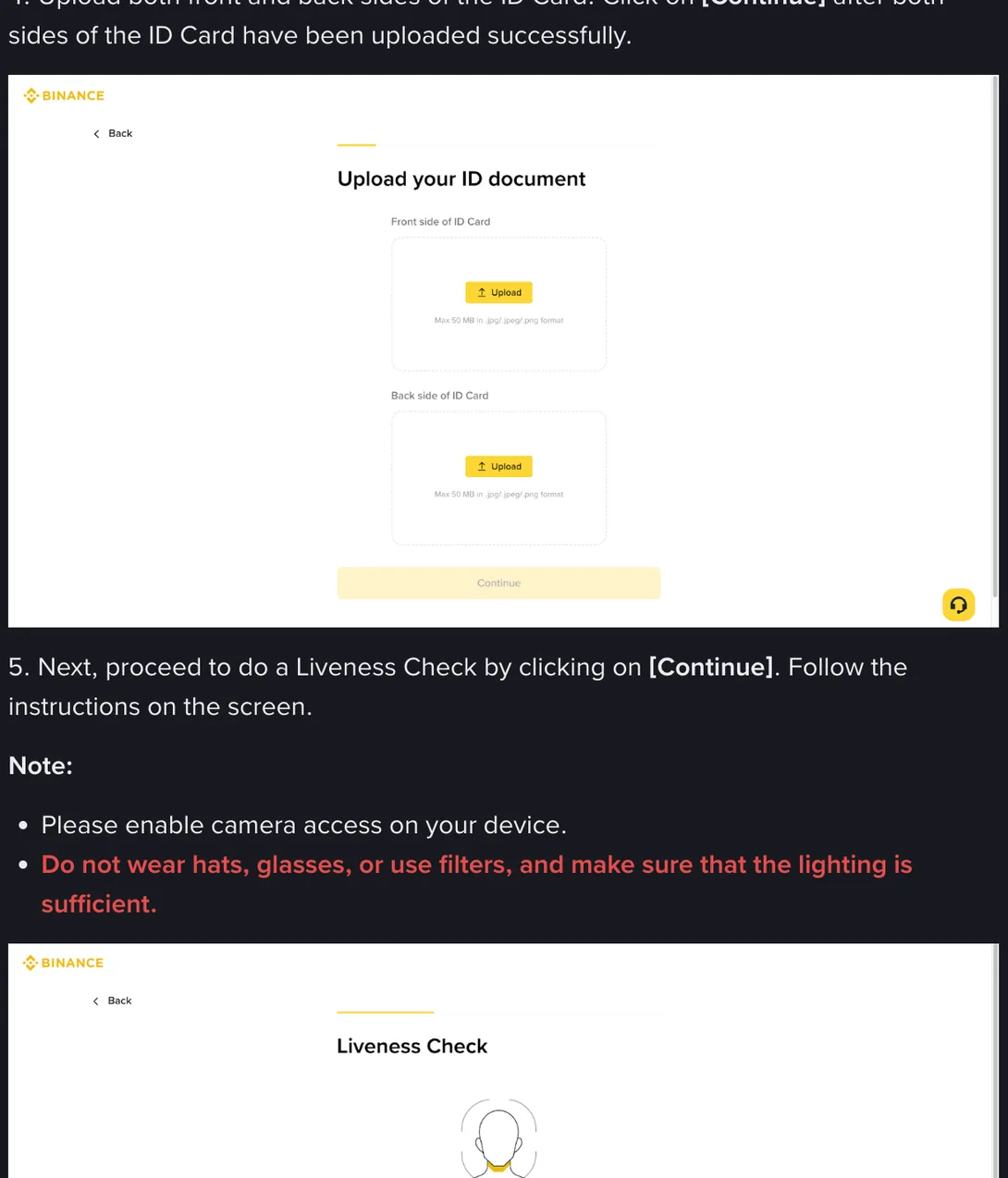
What I can show you is the two things the pages do specify. One is the upload screen above, where the file specification is a size ceiling and three formats, plus the two lines on the screen before it. The other is the shape of a published refusal list, which exists for address documents rather than identity documents: it sits behind the third folded question on the address verification page, and this is what it looks like opened up.
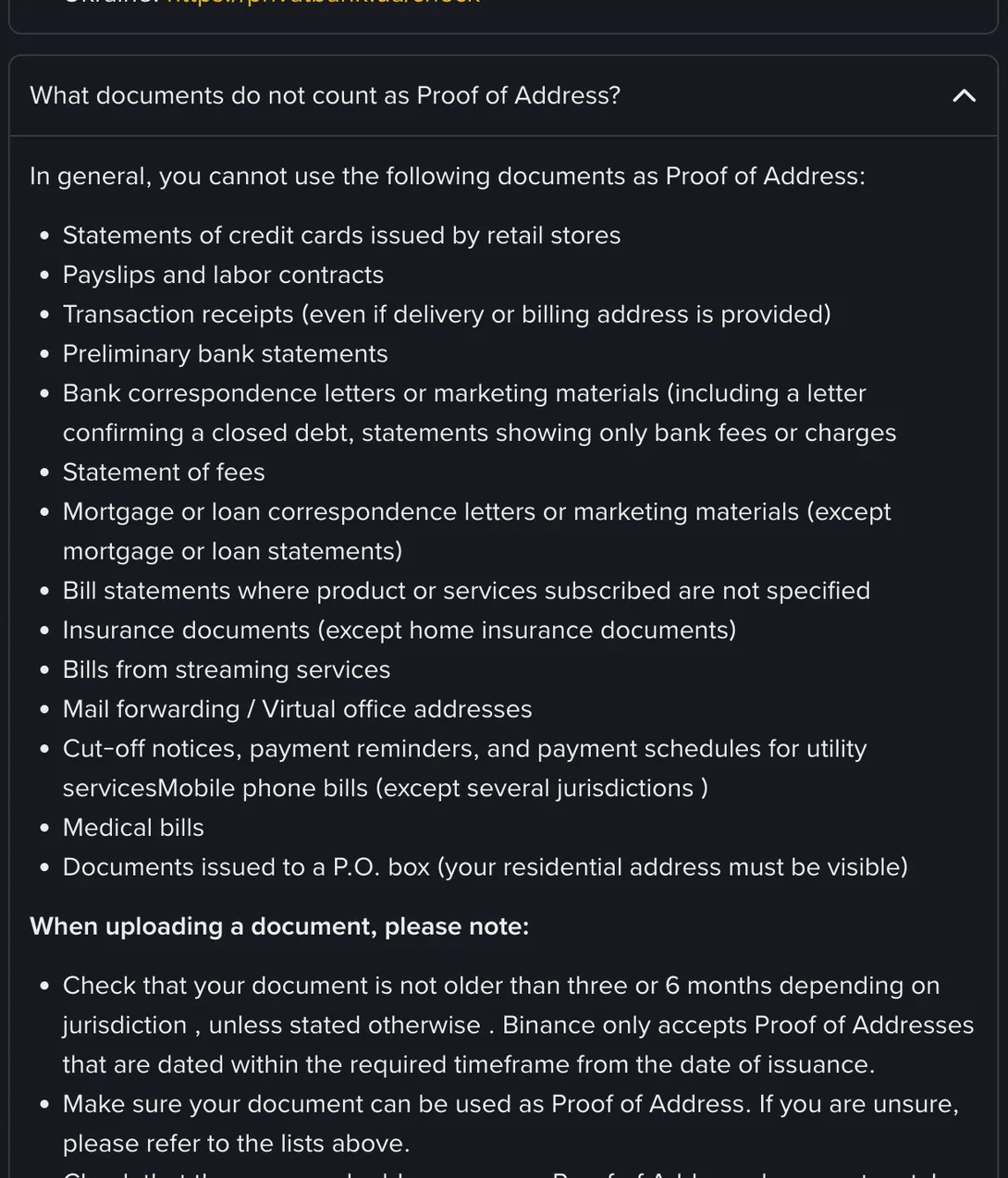
That list is worth reading for what it tells you about how these decisions get made. Payslips are out. Transaction receipts are out even when they carry a delivery address. Mobile phone bills are out in most places, and so is anything sent to a P.O. box. The criterion throughout is the nature of the document, not the state of the file.
From here on this is my reasoning rather than anything Binance has written, and you are free to disagree with it. An identity check works by comparison: software reads the characters, matches the layout against what that document should look like, and later compares the face on the card with the face from the liveness recording. A watermark is an edit made after the fact, sitting on top of some part of that. It does not make the file dishonest, but it does make it a file that has been worked on, and the absence of a published rule is not the same as a guarantee about how an automated check handles it.
There is a second layer people rarely think about. Some cases are decided by software and some go to a person, and those two are not going to react to a mark the same way. A person understands why you added it. Software has no category for intent; it has pixels that do not match the pattern. Which route your case takes is not something you can choose, and the difference between the two paths shows up in how long you wait.
Cropping, colour, glare removal: what each edit costs
Watermarking is one of a family of edits people apply on the way to the upload button, and the others carry their own consequences. Taking the picture well is a separate subject with its own page; this is about what happens after the shutter.
| Edit | What it does to the file |
|---|---|
| Cropping tight to the card | Removes the margin the software uses to locate the four edges, and can shave the border itself. This one causes returns on its own, watermark or not. |
| Brightness or contrast adjustment | Alters the colour and print texture that a comparison relies on. Pushed hard, it flattens the security printing into a grey wash. |
| Painting out a glare patch | Replaces missing information with invented information, which is worse than the glare. Re-shoot at a different angle instead. |
| Sharpening filters | Manufactures edges that were not in the original, which is precisely what an edge-reading check does not want. |
| A light watermark on a blank area | The mildest of the group: covers pixels that carry no data, but still marks the file as processed. |
| Masking any part of the number | Removes a field being read. This is not a grey area. |
The pattern is consistent. Everything that changes what the picture shows makes the file worse for its purpose, and the size of the harm tracks how close the edit sits to the printed data. If you want the picture to need less work in the first place, that is what shooting it properly is for.
Where marking a copy is the right move
Everything above concerns one specific recipient: the verification flow of the platform you are opening an account with. Every other recipient is a different situation, and there the first piece of advice at the top of this page is the correct one.
A letting agent asking for identity, an employer’s onboarding form, a mobile operator, a courier, someone in a group chat who claims to work for an exchange: none of them is running a comparison against a document register. They are keeping a copy. A copy that says what it is for and when it was made is worth sending; an untouched original is not.
The sharpest version of this is the request for a photograph of you holding your document, which is where marking matters most and where the requests are most likely to be fraudulent. That has a page of its own, and it is worth reading before you take one for anybody.
So the split is not watermark versus no watermark. It is which recipient you are dealing with. One of them is comparing; all the others are storing.
If you decide to add one anyway
Some people have a reason to weigh this differently. If your document has been misused before, or you have had an account opened in your name, the distant risk is not distant for you. In that case, the mark has to be heavy enough to be visible and light enough to obstruct nothing, and the gap between those is narrower than the templates in most apps assume.
- Put it on a blank part of the card or on the background. Never across the number line, the expiry line or your photograph.
- Keep it faint. Darker does not protect more; it only covers more.
- Write the purpose and the date, in one short line. No logos, no codes, no paragraph.
- One line of text, not a tiled pattern rotated across the whole image. Tiling is the heaviest form of coverage there is.
- Apply it once, to the original. Do not mark, then crop, then adjust, then compress.
- Keep the untouched original. If the marked one comes back, you want the clean file to hand rather than the light and the desk to set up again.
The apps that promise to protect your identity document by adding a mark for you are the wrong answer to this problem. To avoid the risk of your document leaking, you would be sending it to a company you know nothing about. Whatever you do here, do it on your own device with the annotation tool that came with it.
So, should you watermark an ID photo for KYC?
You can, and for Binance’s own upload flow I would not. The cost of a returned case is certain and near: another review cycle, and the whole set-up again. The risk the watermark reduces is uncertain, distant, and only a slice of the exposure that came with handing over the document at all. Weighing a definite small cost against a vague large one is the part people get wrong, and they usually get it wrong in the direction of the vague one.
For everyone else who asks for a copy, mark it. That is where the habit belongs, and the fact that it belongs there is probably why so much advice applies it everywhere.