Somewhere on your card, usually in the smallest print on it and often abbreviated to two letters and a slash, there is a date. On a passport it sits under the photograph on the data page. On a Pakistani CNIC it is on the front, next to the issue date, in a size that assumes good light. That line is the reason a verified account can stop being verified without anybody touching it, and it is the only line on the document that has a deadline attached to it.
This page is for one particular position: the account works, the document is close to running out or has already run out, and nothing has visibly happened yet.
Will anybody tell you?
You may get a notice. Banks tend to send them, and an exchange may put a message in the account or send an email as a document approaches its end. If you get one, treat it as the prompt rather than as the deadline, and act on it while nothing depends on the outcome.
What I am not going to tell you is that a reminder is guaranteed, because I have no basis for it. Building a plan on a message that may not arrive is how the expiry date gets discovered on the day it matters. The dependable version is a note in your own calendar.
The first warning may well come from somewhere else entirely: a bank app, a form at an office, a renewal notice from a licensing authority. That is the moment to remember that the same document is sitting behind two or three online accounts as well.
What happens to the verification you already have
The honest answer is that I could not confirm it. I looked for a statement on Binance’s pages about what becomes of an existing verification when the document behind it expires, and in September 2026 there was none to find. No stated grace period, no stated cut-off, nothing about the state your account goes into.
If an article gives you a specific timescale for this, check whether it says where the figure came from. So rather than a rule, here is what is knowable. A verification is a comparison between a person and a document. When the document is no longer current, the comparison is anchored to something out of date, and any process that repeats the comparison later has less to work with. Whether that produces a request tomorrow, a request in a year or no request at all is not something anybody outside the platform can tell you.
Which is also a reason not to panic on the day. The account not exploding at midnight is the normal case. The thing to avoid is discovering the situation on the morning you need to move something, because at that point you are waiting on a review with no way to hurry it. Worth separating from the money side entirely: how an account is documented has no bearing on what happens to the value inside it, and that value can fall to nothing however tidy the paperwork is.
Where the update route sits
There is a defined route for this, and it is easy to miss because it is folded away.
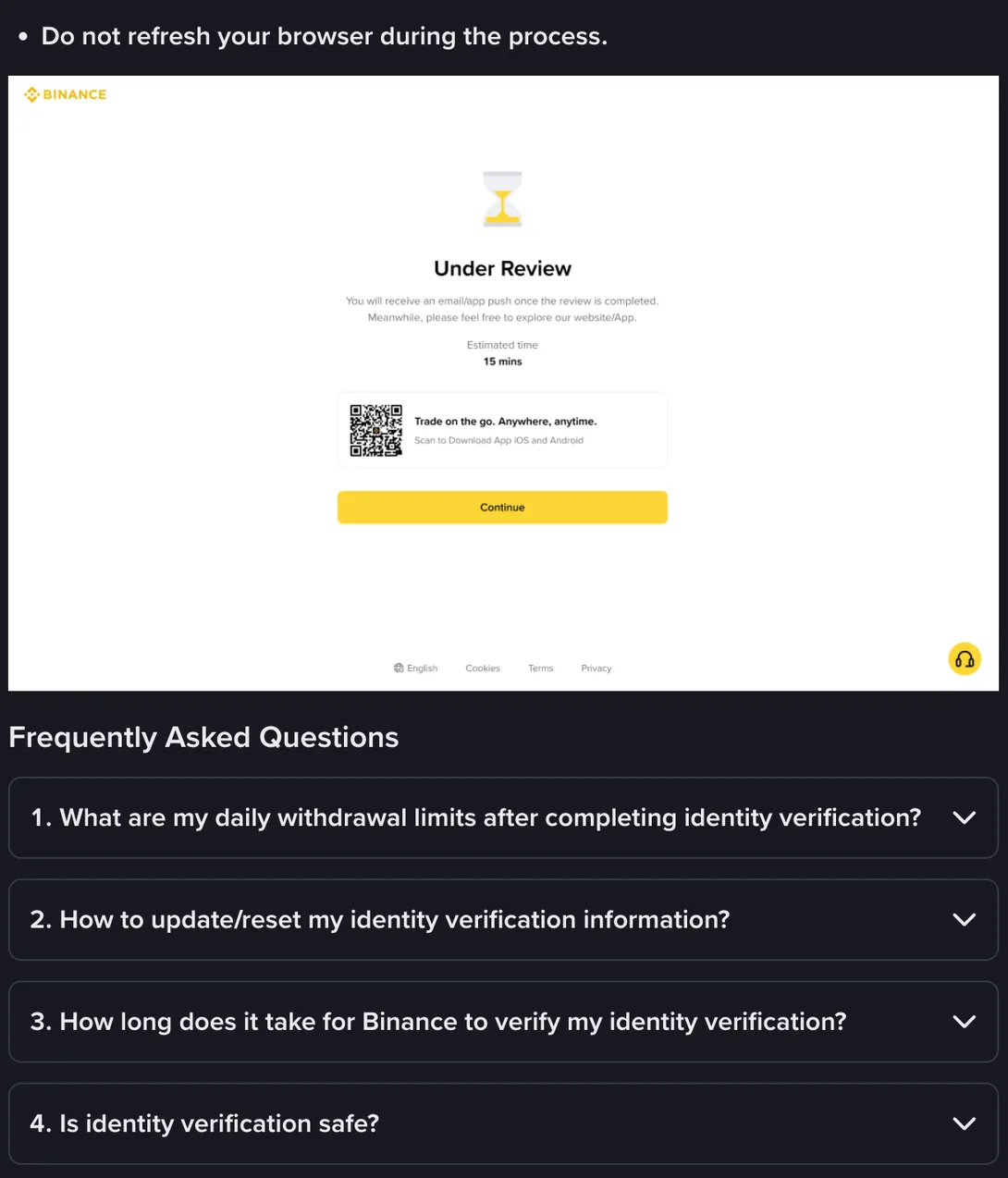
That second item is where the update process is described, and it is collapsed by default, so a search inside the page will not surface a word of it. You have to scroll to the bottom of the identity verification guide and click the question itself.
Open it and the first line sets the condition: “If your identity information has changed and one of the following conditions is met, you can go to the [Identification] page to update.” Then comes the list of acceptable reasons, and the first entry on it is “The documents have expired”. So the case this page is about is not one you have to improvise around. It is the first situation Binance names for this route.
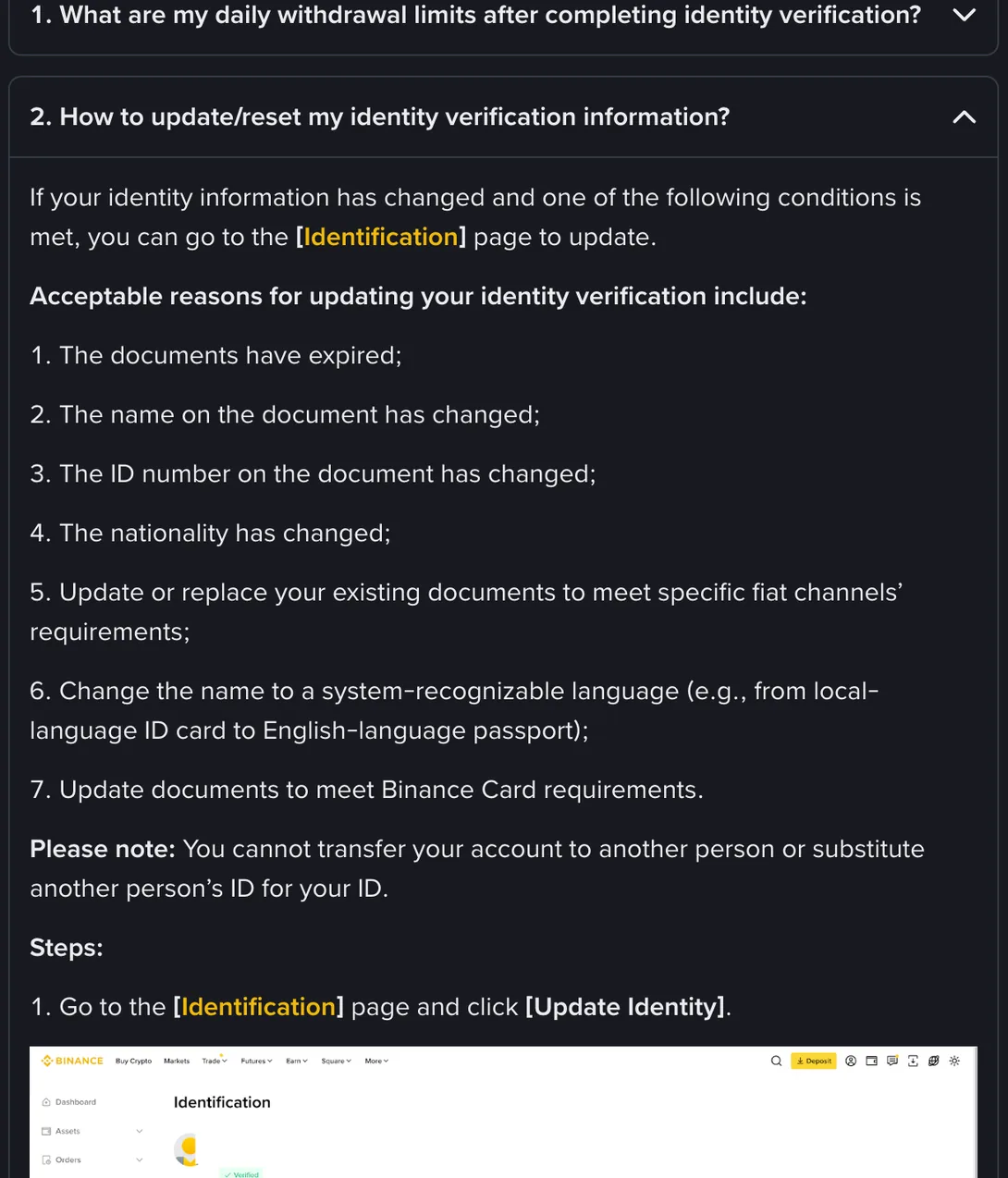
The steps below the list begin where you would expect: “Go to the [Identification] page and click [Update Identity].” That is the same page that has been showing your verification status all along. The button on it is easy to overlook until you need it.
The other entries cover a changed name, a changed document number, a changed nationality, and documents that have to be swapped to meet the requirements of a card product or a fiat channel. The route is wider than the expiry case, which is worth knowing before something else on your card changes as well.
Notice what the framing implies: this is the route for information that has changed, not the route for an application that was refused. Those two get confused constantly, and they need different things from you. If your case was sent back, the sequence for that is a separate one.
The screens you go back through
The update is not a special form. It runs through the same document flow you did the first time, which means the screens are the ones you have already seen.
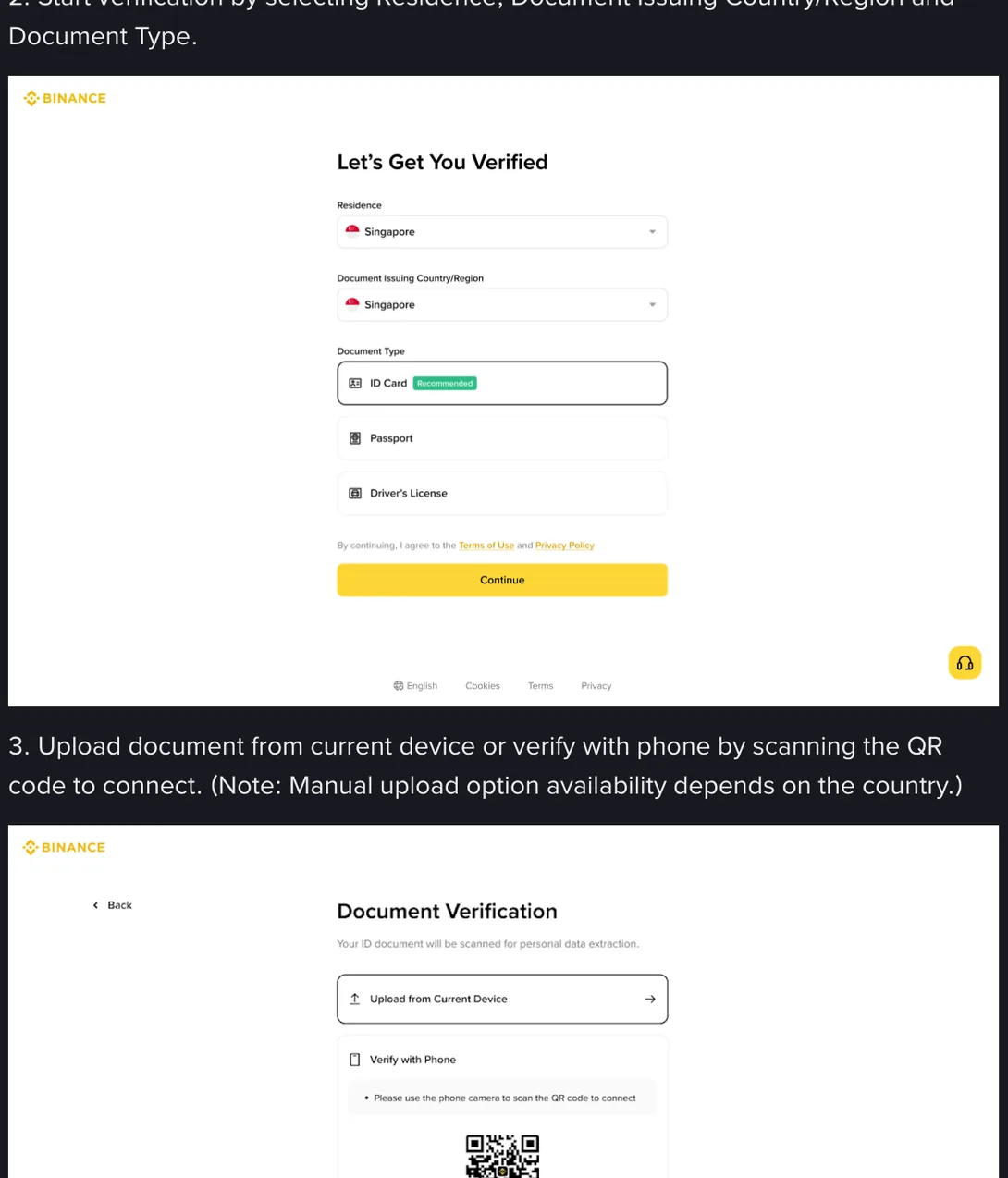
Three fields change when a card is renewed: the document number, the expiry date, and the photograph on it. Almost everything else stays as it was, assuming you have not changed your name or your nationality, which is why this is a smaller job than people brace for.
The part to slow down for is the spelling of your name. If the old record was built from a passport and the new document is a national card, or the other way round, the Latin transliteration may not be identical on the two. That difference is a mismatch, and the fields it lands in are not ones you can freely edit afterwards. There is a page about which boxes settle for good, and it is worth reading before you type rather than after.
The document type itself deserves a fresh thought as well. If the old verification used the card that is expiring and you now hold a newer passport, you are not obliged to stay with the same kind of document.
One sequencing point. Finish the platform side and see it accepted before you go and update the cards, payment methods and anything else attached to the account. Doing it the other way round leaves a window where your bank knows about the new document and the exchange does not, which is the window mismatches live in.
Which documents even carry a date
This whole question does not apply evenly, because not every identity document expires.
| Document | Expiry |
|---|---|
| Passport, any country | Has a date on the data page. Renewal usually issues a new number as well. |
| Pakistani CNIC | Most carry an expiry date; some are issued for life, so read your own card. Renewal is a routine errand, not an exception. |
| Indian Aadhaar | Carries no expiry date. There is nothing to renew and nothing to update on that basis. |
| Driving licence | Has a date, and it is often the earliest of the documents in your wallet, since licences typically run shorter than passports. |
| National identity cards elsewhere | Varies. Some carry a date and some do not. Read the card rather than assuming from a friend’s. |
If the document you verified with does not expire, this page is not your problem and you can stop here. If you verified with a passport and also hold a card that does not expire, you have a choice available the next time you are asked for something.
A new passport that goes into a drawer the week it arrives tends to resurface on the day you actually need the account to work, when the account is still holding the old number. Nothing dramatic follows. It just means sending documents and waiting, on a day you had not planned to do either.
Start a month before the date
Here is the short version, for the position of having a renewal in hand or a date approaching.
- Take the card out and read the expiry line properly, in good light. The abbreviated form on some cards is easy to misread by a year.
- Renew the document itself first. Nothing on the platform side can be done with a document that has run out.
- In the week the new one arrives, while it is on your desk and the number is fresh, open the account and go through the update route.
- Do it on a day you do not need the account for anything else.
- Then, and only after the platform side shows as accepted, update everything else that holds the old document.
A workable rule: a new document does not get put away until it has been through every account that holds the old one. It takes an evening, once, on a date you choose.