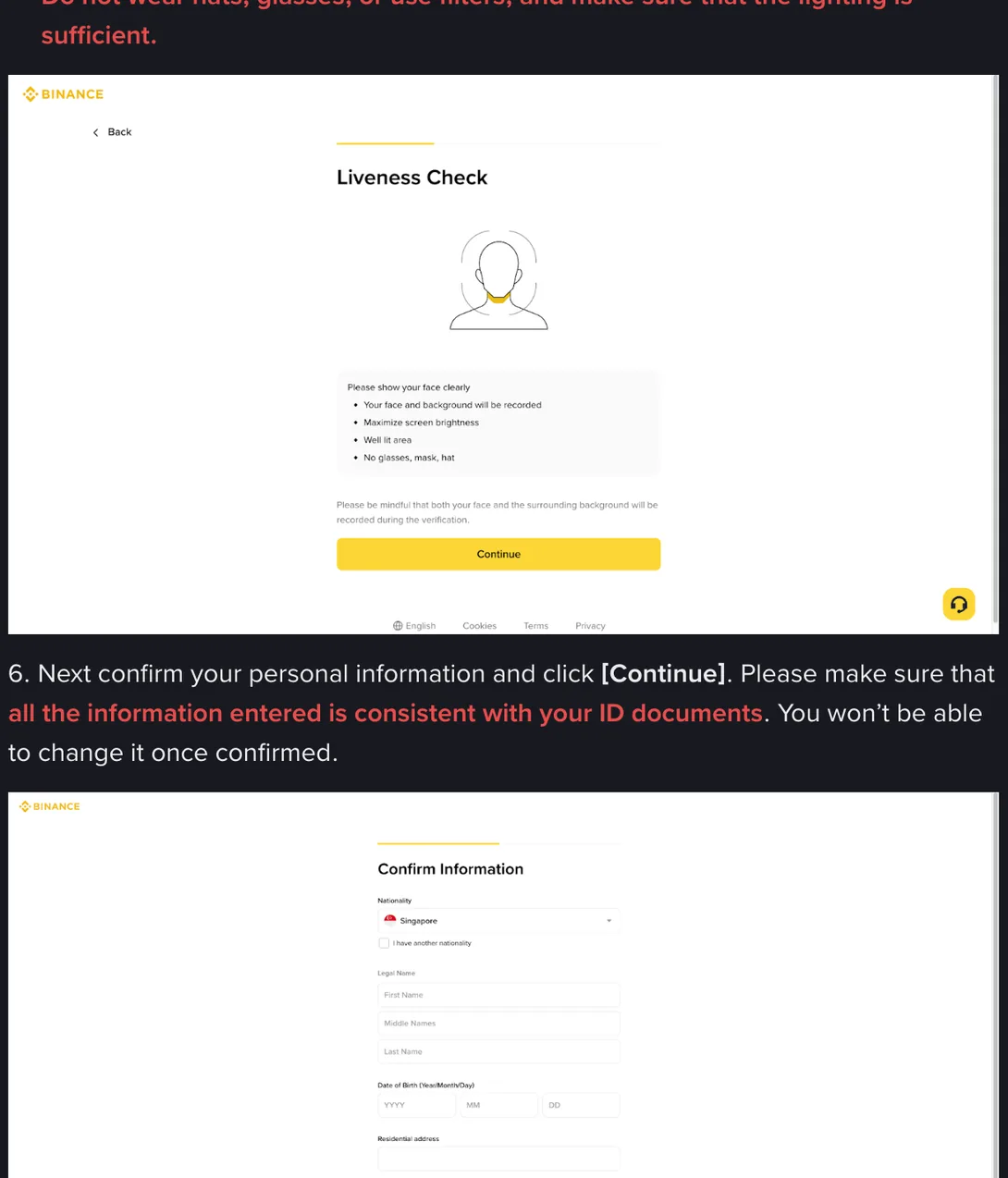
Please make sure that all the information entered is consistent with your ID documents. You won’t be able to change it once confirmed.
That is step 6 of Binance’s own identity verification guide, and it is the reason this page exists. Nothing on the screen looks different from any other form. The boxes are the same shape as the ones where you pick a notification setting. Then one day you need a name changed, and you find out which kind of box you were filling in.
So this is a page about the boxes on that one screen, and about what to put in them when your name, your nationality or your document does not have the shape the form expects.
What is actually on that screen
The step is called Confirm Information and it arrives after the liveness recording, at a point where it is easy to have stopped concentrating. It asks for Nationality, with a checkbox reading I have another nationality; Legal Name, split into First Name, Middle Names and Last Name; Date of Birth as year, month and day; then Residential address, Postal Code and City. Along the bottom, in small print: by continuing, you agree that the above captured personal data is accurate.
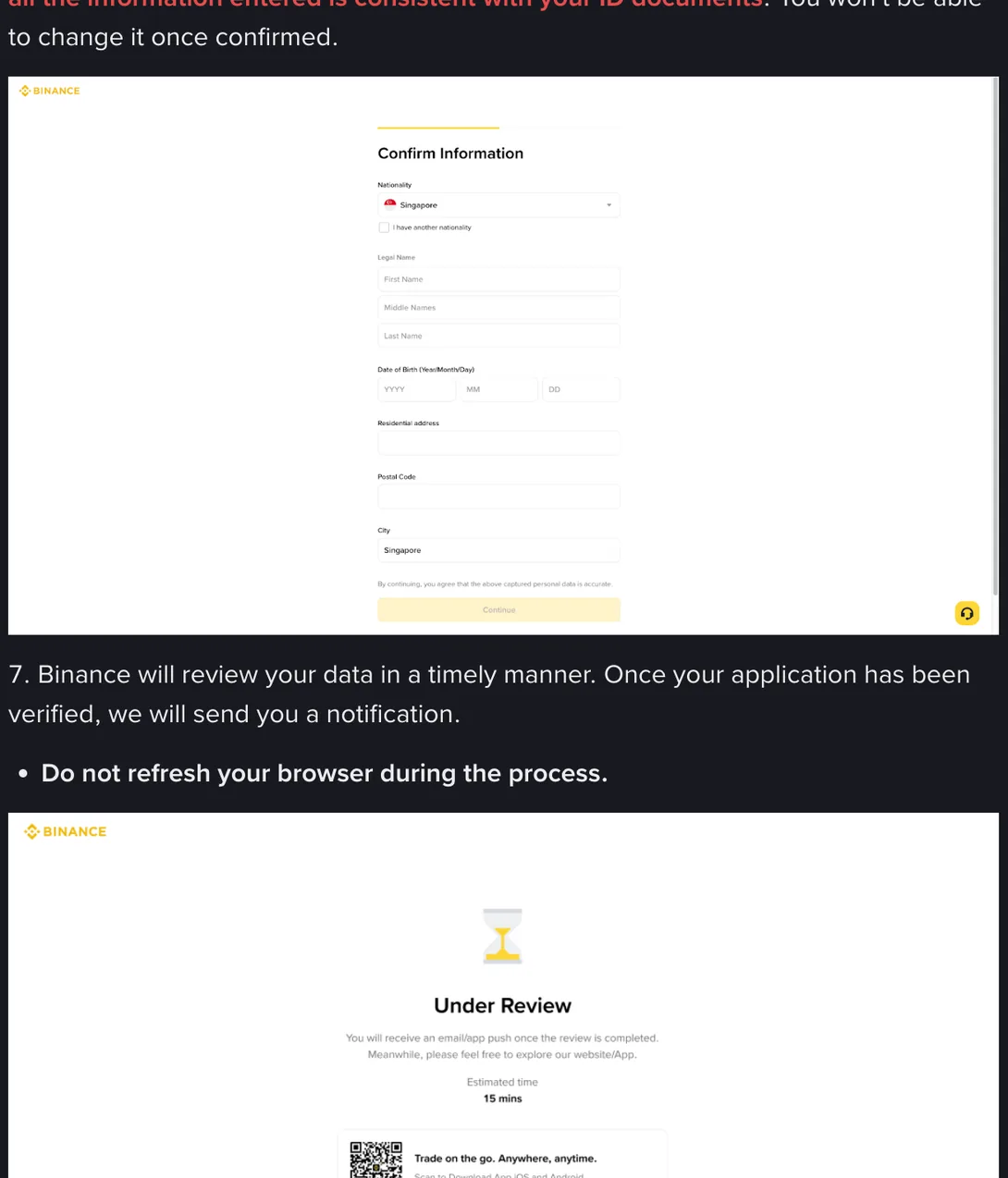
Captured, not entered. Much of what sits in those boxes was read off your uploaded document by software and placed there for you. If it misread a character, that is not the machine’s mistake once you press Continue; it is yours. The right posture for this screen is not checking your own typing. It is auditing somebody else’s.
It is worth photographing this screen with a second phone before pressing Continue. Not as evidence of anything, and not because a dispute is likely: simply so that months later, when a form somewhere asks what name the account is under, you can look instead of guessing. The referral-code box belongs on the same screen-check: if you mean to use one, it is easiest to enter before Continue. Whether it can be added after the account exists, I could not confirm on Binance’s pages when I checked in September 2026.
Legal Name, when your name does not fit three boxes
First Name, Middle Names, Last Name is a European template, and not every name is shaped like that. The rule that survives every one of the cases below is the same: copy the document you are uploading, character for character, in the arrangement the document uses. Not the spelling on your degree certificate, not the one your employer uses, not the one you prefer.
When the document is not in Latin script
An Aadhaar card carries Devanagari and Latin. A CNIC carries Urdu and Latin. A Sri Lankan NIC prints Sinhala, and a passport from any of these countries prints a Latin version on the data page. Use the Latin string that is already printed on the document you upload. Do not romanise the local script yourself, and do not correct the transliteration you disagree with, because Mohammad and Muhammad are two different strings to a checker even when they are one name to you.
If the document you are uploading has no Latin anywhere on it, the document is doing the work of matching, and that is an argument for using the passport instead.
No surname, or an initial in place of one
Across South India, and in parts of Indonesia, Afghanistan and Myanmar, people have one name, or a given name with a father’s name attached as an initial: S. Kumar, or the longer Sri Lankan version with four initials in front. Passports handle this in their own way, and that way is your answer. Look at the data page: whatever is printed under Surname goes in Last Name, whatever is printed under Given names goes in First Name and Middle Names. If the surname line is blank, do not invent one to fill the box and do not move part of your given name across to balance the form.
The initials themselves are worth a thought. An NIC may print K. A. D. N. Perera while the passport spells the same name out in full. Those are two different strings, and the one that has to match is on the document you upload.
Arabic names with four parts
A full Arabic name is often given name, father, grandfather, family name, with bin or ibn linking them. The passport has already made the decision for you: the family element sits under Surname, the rest under Given names, and bin or ibn stays attached to the element it belongs with, exactly as printed. Do not compress four parts into two because the form has three boxes, and do not drop the linking word because it looks like a preposition.
Two surnames
Goan, Sri Lankan Burgher, Filipino and Hispanic naming conventions often give a person two family names. Both belong in Last Name if that is how the passport prints them. Dropping the second one, which people do because a form once made them, produces a mismatch on every future document you upload, including the bank statement you use as proof of address.
Names are not the only thing here that fails to be uniform. Which boxes this screen shows you, and how many, comes from the flow your account was routed into, and that routing is set locally and revised. So the version in front of you is the version that applies, and nothing on this page is legal or investment advice.
Nationality, and the checkbox underneath it
Nationality is its own dropdown, and it is not the same question as where you live or which country issued your document. A Pakistani citizen living in Nairobi on a Pakistani passport answers those three with three different values.
Under the dropdown sits a checkbox: I have another nationality. Dual nationals meet this at the end of a long process and tend to fill in whichever passport is in their hand, tick nothing, and continue. That is the wrong instinct. Which nationalities you declare has a bearing on which local requirements apply to your account, and a declaration you skipped is harder to explain later than one you made at the start.
Date of birth
Three selectors: year, month, day. The failure is boring and extremely common, and it is a habit problem rather than a knowledge problem. Documents across India, Pakistan, Kenya and Australia print the day first. Someone born on the fifth of September reads 05/09 off the card, sets the month to five and the day to nine, and has just told the platform they were born on the ninth of May. Every other field is perfect. The case comes back saying the information does not match the document.
Read the selector labels rather than the order you are used to, and check the year separately: on a card printed in a small font, 1985 and 1935 are one glance apart.
The two country fields you set before this screen
Two of the values on the confirm screen were decided earlier, on the first screen of the flow, and they are the ones people get wrong before they have even started paying attention.
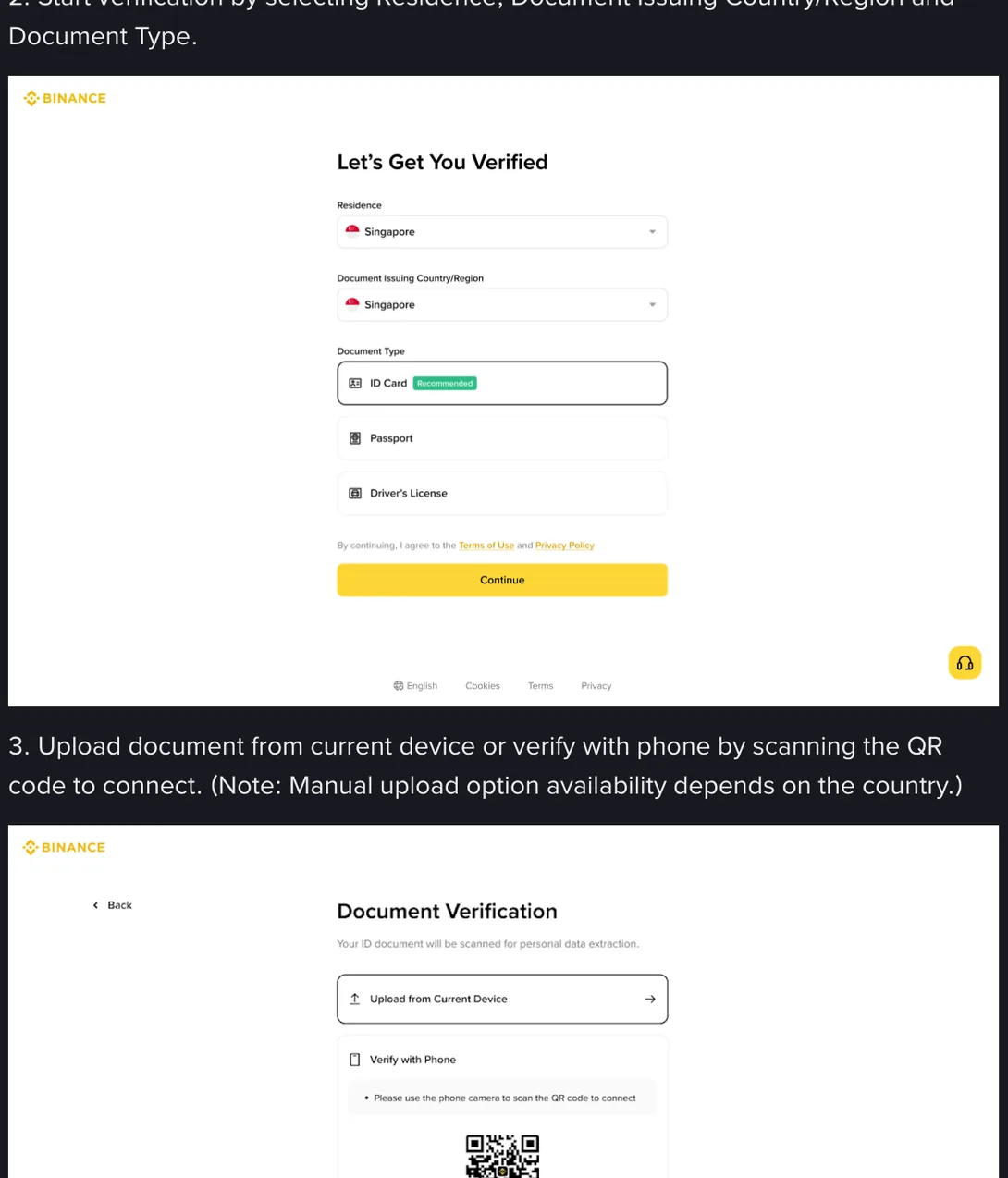
Residence means where you live now. Document Issuing Country/Region means what is printed on the card or passport you are about to upload. They are separate because for a large share of the people reading this they genuinely differ: an Indian student in Melbourne, a Kenyan working in Johannesburg, a Pakistani in the Gulf on a CNIC.
Setting them both to the same value out of habit does two things. It can offer you a document list that does not contain the document in your hand, and it puts a residence on your record that does not match the address document you are going to upload later. Say the two questions to yourself before you touch the dropdowns: where do I live, and where was this document issued. Then click.
Moving country afterwards is a separate matter with its own consequences, and it has a page of its own.
What can still be changed
The quoted sentence covers the confirm screen as a whole: once you press Continue, none of it is yours to retype. That is not the same as saying the values are sealed for life, and the difference is worth getting right.
The route is written down, in the second of the five questions the help page ends with, headed How to update/reset my identity verification information. It is folded shut by default, which is why almost nobody has read it. The answer opens with a condition: “If your identity information has changed and one of the following conditions is met, you can go to the [Identification] page to update.” Under that sit seven reasons Binance treats as acceptable. Four of them are the ones people arrive at this page worrying about: the documents have expired, the name on the document has changed, the ID number on the document has changed, the nationality has changed. The remaining three are about swapping a document to meet the requirements of a fiat channel or a Binance Card, or moving to a document in a language the system reads. The steps under the list start in one place: “Go to the [Identification] page and click [Update Identity].”
So the lock is narrower than the folklore around it, and stricter in a different direction. You cannot reopen that screen and put a different nationality in because you would prefer one. You can start the update route when the document underneath has genuinely changed, and an expired card is the first case Binance names for it, which is a whole situation of its own. What the seven reasons have in common is that something changed in the world, not that something was typed carelessly. A date of birth entered wrong on the day is not on that list, which is why it goes to support as a correction rather than through this route.
One line sits under the list and it is the boundary on all of it, quoted here word for word: “You cannot transfer your account to another person or substitute another person’s ID for your ID.”
What is clear from the shape of the process is why the confirm screen locks at all. Your name, date of birth and document number were not stored as preferences. They were compared, character by character, against a document and a face, and the result of that comparison is the record the platform holds to show it knows who its customer is. A record you could rewrite at will would not be a record. That is also why support cannot simply retype a value for you: a changed document has a route, and a value that was wrong from the start is a case somebody has to weigh.
One field on that screen behaves differently in daily life, and it is the last one worth talking about. People move house. A residential address is expected to change, and changing it is not an argument about what your name is; it is a request to support a new value with a new document, which means one more proof of address, issued within whatever window applies where you live, showing the new address and your own name on it. That is the difference between the address boxes and the ones above them: the address costs you a billing cycle, while a name typed wrong on the day costs you a case nobody can promise the outcome of.