A rejection is narrower than it feels. Your account is still there, your password and two-factor setup are untouched, and nothing you own has been taken away. What has been used up is one specific thing: the verdict on the exact set of files you sent. Send that same set again and you are asking a question that has already been answered.
This page is only about the mechanics of going round again. Why a case was rejected in the first place is sorted into twelve causes on its own sheet; work out your cause there, then come back here for the procedure.
Worth saying once, before any of it: none of this is about whether to buy anything. Verification is paperwork. The money that goes through the account afterwards is a different object altogether, and it can come back as nothing.
| From the last attempt | Where it stands |
|---|---|
| The account, login, two-factor setup | Unaffected. A failed verification does not close an account |
| The image files still on your phone | Keep them. They are the only record of what was judged |
| The verdict on those files | Spent. An identical resubmission asks the same question |
| The name and date of birth you confirmed | Not free text. Editing those is a different procedure from re-uploading a photo |
Where the second attempt starts
You start where you finished: on the identity verification page in your account, reading whatever state it currently shows. Not from a search result, not from a link someone sent you.
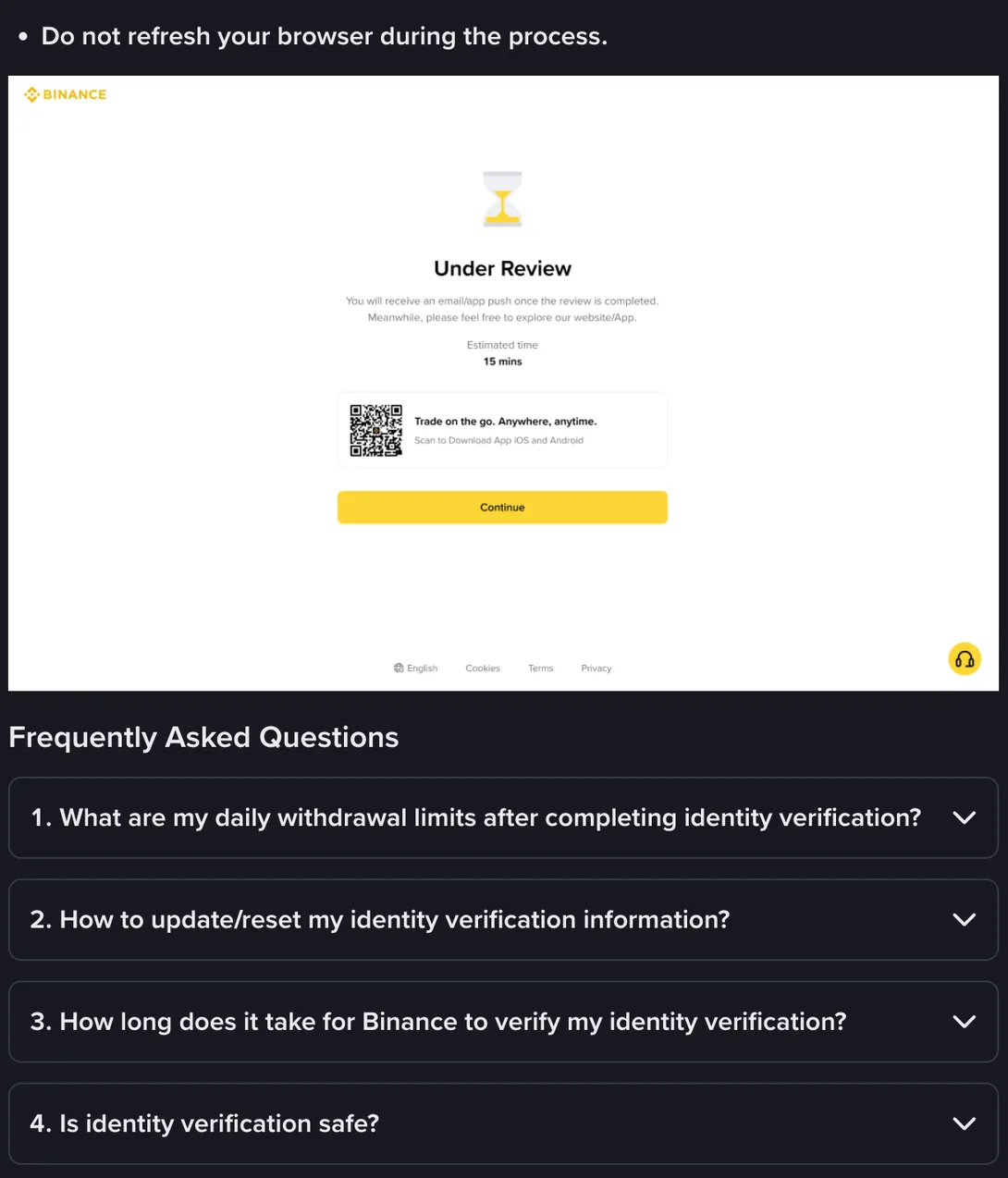
That second item is collapsed by default, which is why so few people have read it, and what sits behind it is an update route rather than a resubmission route. Opened, it starts with a condition: “If your identity information has changed and one of the following conditions is met, you can go to the [Identification] page to update.” Under the list of reasons, the steps begin in one place: “Go to the [Identification] page and click [Update Identity].”
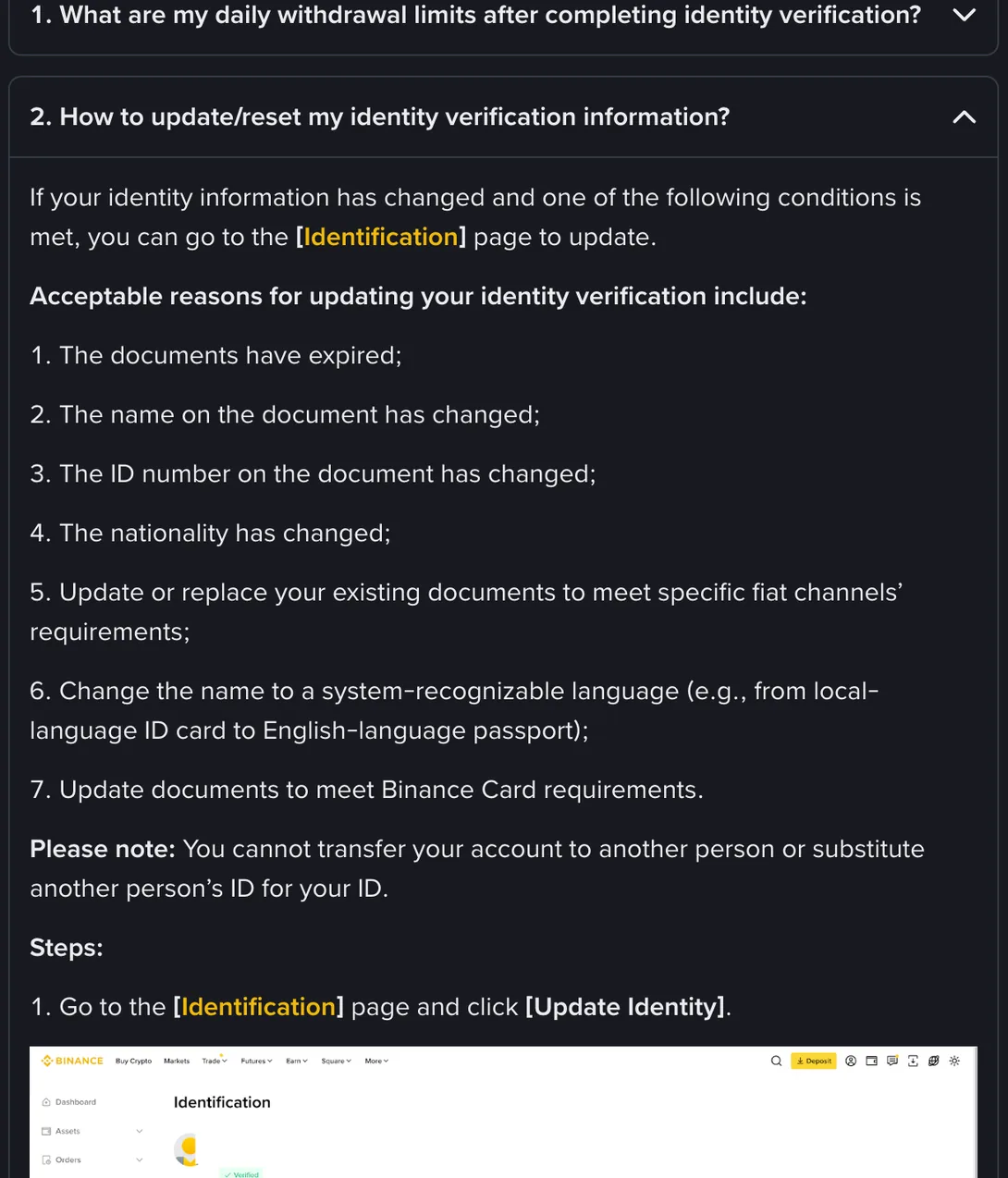
Seven reasons are listed as acceptable, and four of them are the ones that send people back to these screens: the documents have expired, the name on the document has changed, the ID number on the document has changed, and the nationality has changed. The remaining three are about swapping a document to meet the requirements of a fiat channel or a Binance Card, or moving to a document in a language the system reads. What every one of them has in common is that something changed in the world. A photograph that came out badly is not on that list.
The reason the distinction matters: updating your identity details and correcting a rejected upload are not the same errand. If your legal name changed, or you replaced an expired document with a new one carrying a new number, the details on file need to change. If your name is spelled exactly as before and only the photograph was unreadable, nothing about your identity has changed and you need a new photograph, not a new identity. Both may land you on the same page. They are not the same work.
Fix what you know is wrong, test the doubtful one at a time
The instinct after a rejection is to fix everything at once: new photographs of both sides, a different document type, a corrected spelling of the middle name, a fresh address document, all in one go. It feels thorough. It destroys your ability to learn anything.
If that combined attempt comes back too, you have no idea which of the four changes was irrelevant and which one was still wrong. A rejection costs you a wait; a rejection that teaches you nothing costs you the wait and the next one.
That doesn't mean sending a known error back for review. Anything you have checked against the document and know is wrong, fix all of it this round. For the doubtful ones, where you can't tell, go one variable per attempt, starting with the one the message pointed at. Read the wording you were given for a single distinction, whether it talks about the document or about the information. Words like unclear, unreadable or invalid point at the image file. Words like does not match or inconsistent with your document point at the fields you typed. Those two lead to opposite actions and share no steps.
Leave the identity data alone unless it is demonstrably wrong against the document in your hand. Names, dates of birth and document numbers are not fields to experiment with between attempts, partly because some of them stop being editable once confirmed, and which ones those are is worth knowing before you touch them rather than after.
Write down what you changed, one line, before you submit. Not for tidiness: for the third attempt, when you will genuinely not remember whether you already reshot the back of the card.
Attempts and intervals: what is actually published
People want two numbers here, a cooling-off period and a maximum number of tries, and this site is not going to supply either, because no such figure appears on Binance’s help pages, at least none we could find reading them in September 2026. The specific hour counts circulating on forums and aggregator sites trace back to nothing.
What survives the absence of a published rule is a practical one. The pacing of resubmissions should be set by the material, not by the clock: submit when something real has changed, and if you cannot name what changed, do not submit. That rule also happens to answer the interval question by itself, since reshooting a document properly needs daylight, and there is only so much of that in a day.
What turns a quick decision into a slow one
Binance does not describe how cases are routed internally, so read this as what adds work to a case rather than as a description of any machinery.
Changing several things at once is the first. A case where the document type, the images and two typed fields all differ from last time is not a small correction; it is a new application that happens to sit on an old file.
Submitting repeatedly in quick succession is the second. Three attempts in an hour, all with slightly different photographs of the same card, is a pattern that has to be looked at rather than skimmed.
Switching document types back and forth is the third. Moving from an ID card to a passport once, because the passport is in better condition, is ordinary. Cycling through three document types in an afternoon is not, and each switch also changes which country rules apply to the case.
And anything that makes your own answers disagree with each other, a name typed one way and printed another, an address document naming a different country from your residence, adds a question that somebody has to settle before anything else can be decided.
When to stop trying and talk to a person
Some situations cannot be fixed from your side, and continuing to reshoot photographs in them is pure loss. Stop and open a support ticket when:
- The message says the document is already in use. That involves another account, and no amount of re-uploading resolves it.
- You have changed the thing that was flagged, twice, and the same wording comes back. Your reading of the cause is wrong, and another attempt will not correct your reading.
- The flow does not reach a submit button at all, or the verification entry point is unavailable.
- You are told to supply something the interface gives you nowhere to supply.
Bring specifics to that conversation: when you submitted, which document type, the exact line currently on your screen, what you have already changed, and what you want confirmed. Asking why it failed will usually get the same short sentence read back to you. Asking what state the case is in, or whether anything further is needed from you, is a question someone can actually look up.
One habit worth keeping: never volunteer a document photograph or a document number in a chat window. Documents go in the upload boxes the flow provides, however urgent it feels. The exception is a security appeal such as a 2FA reset, where Binance's help page says the material can go through the appeal page or live chat; even then, make sure you opened that chat yourself from the Binance website or app and that support asked for it there, not through a link or message someone sent you.
The two moves that make everything worse
Both come from the same impulse, which is to get around the check rather than through it.
The first is opening a second account and verifying it with the same document. One document to one verified personal account is standard practice across this kind of platform, and a duplicate is precisely what the check is built to notice. The likely outcome is two blocked cases instead of one, and a harder conversation than the one you were avoiding.
A second account verified on the same document is the one move that turns one fixable case into two frozen ones. If an older account of your own is already holding that document, recovering the old account is the route out. Opening a new one is not, and it is a worse idea under a set of local rules you have not read than it looks from here.
The second is using somebody else’s document, or paying for an account that has already passed. An account verified in another person’s name is not yours in any sense that matters: withdrawals are checked against the verified holder, the person whose documents were used can reclaim it, and you have no standing anywhere if they do. The market that sells those accounts, and the people who lose money to it, is a page of its own.
The file itself: format, size, and what the screen accepts
Last, the mechanical part, because a surprising number of second attempts fail on the file rather than on the photograph inside it.
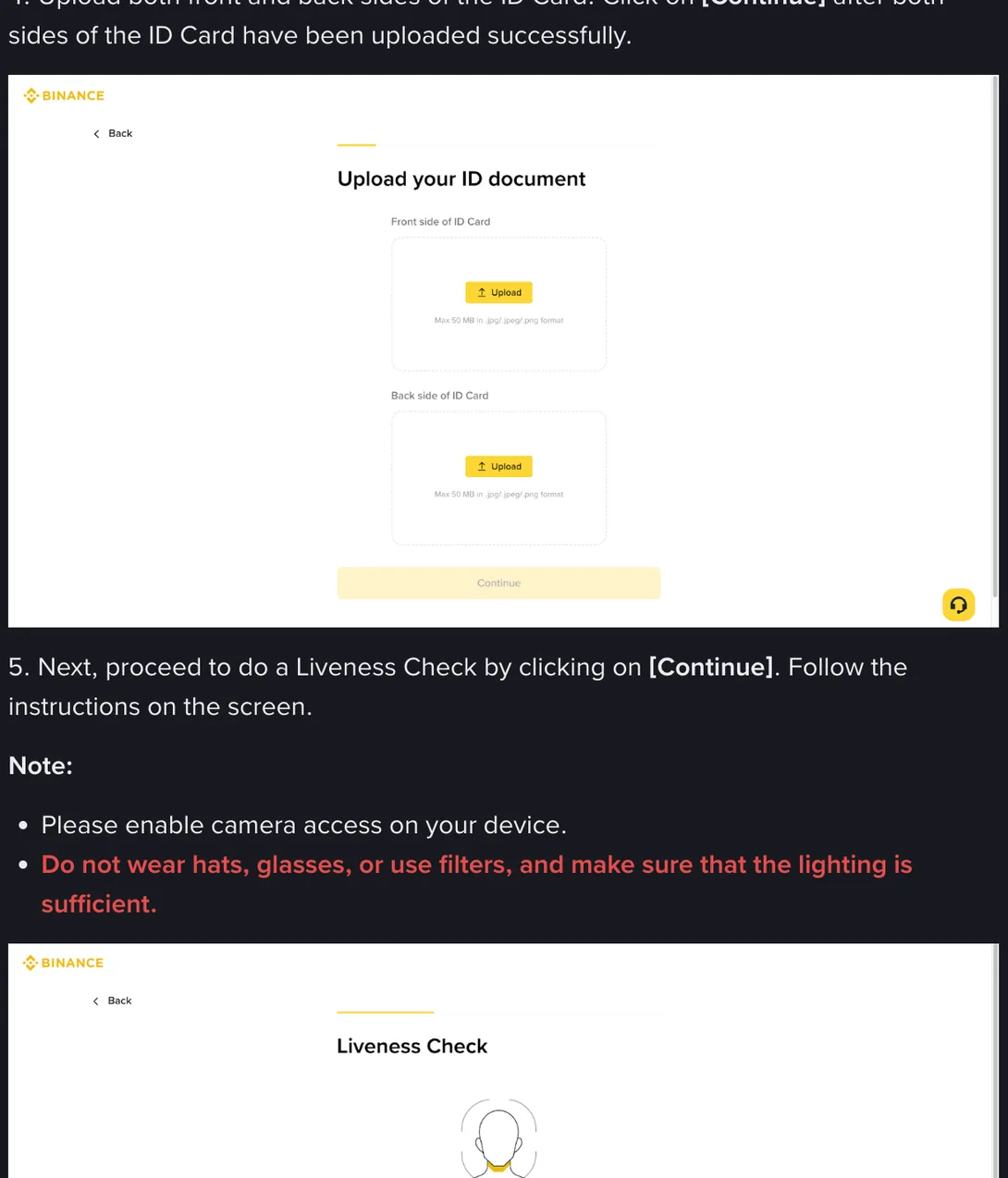
Fifty megabytes, and three formats. It is worth knowing because the two megabyte figure repeated across tutorial sites for years does not match what that screen says, and people have been compressing perfectly good photographs down to mush to satisfy a limit that is not there.
Which does not mean bigger is better. A large file on a weak connection is a slower upload with more chances to fail partway, and a photograph that is unreadable at 40 MB is unreadable at 4. The size limit is headroom, not a target.
Format is where phones catch people out. An iPhone shooting in HEIC produces files that are not on that list, so switch the camera to Most Compatible or export a copy as JPEG before uploading. A PDF scan is not on the list either, which surprises anyone who scanned their document at an office. And that screen describes this particular upload step. A different entry point, or a different country’s flow, may print something else under the box, because what an upload screen will take is a local setting and Binance revises it. So read the box in front of you rather than this page, which is a description of one screen in September 2026 and not advice of any kind.