Nobody is looking at this photograph. Software is: it hunts for a rectangle in the frame, decides where the four edges are, flattens out the perspective, and then reads the characters off the result one line at a time. Every instruction below comes out of that one fact, and none of it is about making the picture look nice.
What the upload screen asks for
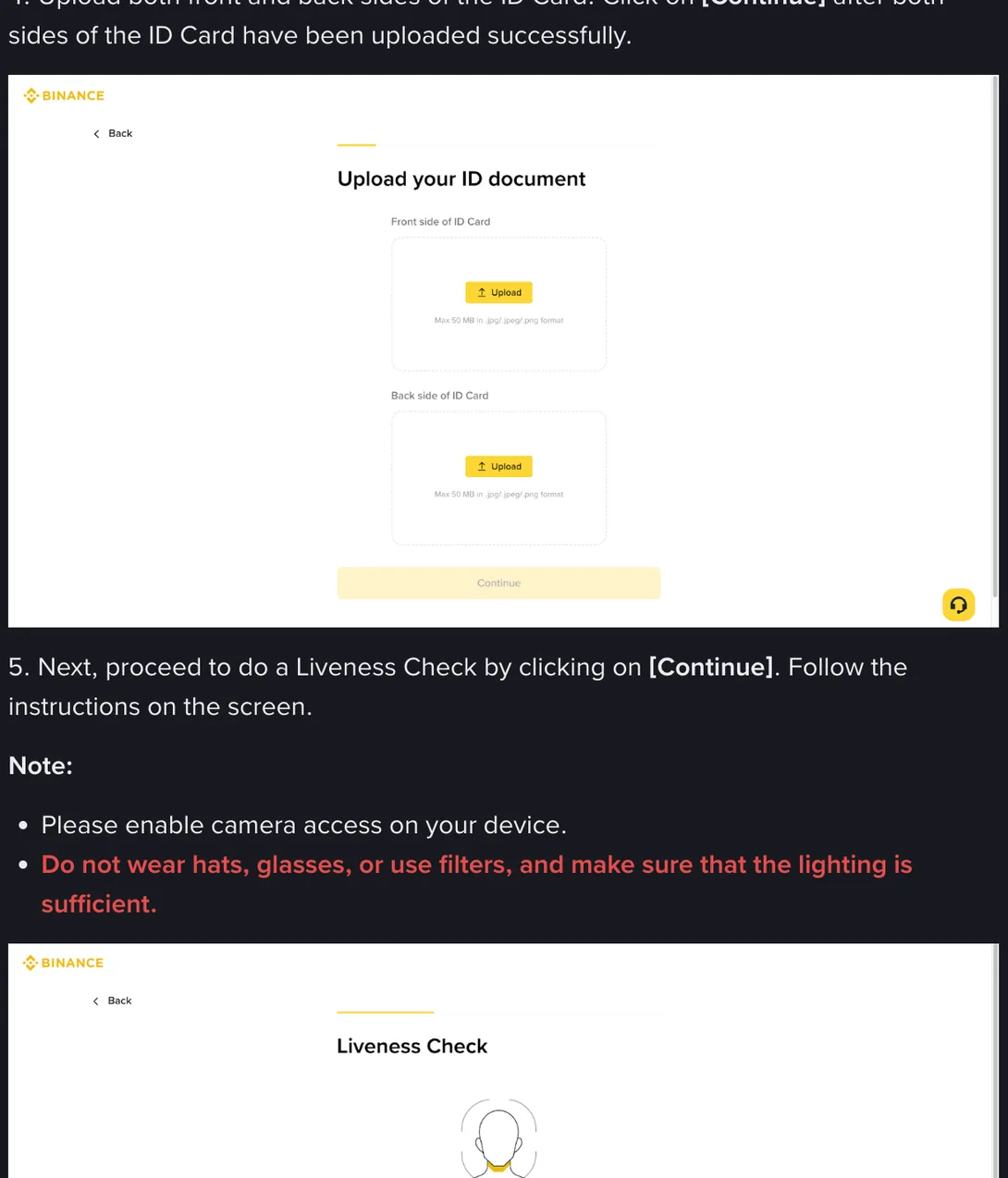
Step 4 of Binance’s identity verification guide is one sentence long: upload both front and back sides of the ID Card, then click Continue once both sides have uploaded successfully. The screen behind that sentence has two upload boxes, one for each side, and under each box sits a line of grey text.
Max 50 MB in .jpg/.jpeg/.png format
Fifty megabytes, so there is no need to compress the picture into mush. You do not have to take my word for it, and you shouldn’t: open the verification page yourself, get to the upload step, and read the line under the box. It is quicker than reading this paragraph.
One thing on that same screenshot is regularly attached to the wrong step. Underneath, in red, the guide says: do not wear hats, glasses, or use filters, and make sure that the lighting is sufficient. That belongs to step 5, the liveness check, where the camera records your face. It is not a rule about photographing a card. The filter half of it is worth carrying across anyway, for reasons in the table below, but the hats and glasses part does not touch the picture you are about to take.
Six things the check needs from the picture
Here is what the check needs from the picture, with the desk-level version of each.
| What the check needs | What that means at your table |
|---|---|
| All four corners inside the frame | Leave a band of empty desk around the card. A border touching the edge of the picture reads as a document with something cut off it. |
| No glare on the surface | One white patch across the number line and that line is gone. Your eye skips the patch; the reader treats it as a blank. |
| Nothing trimmed afterwards | Cropping in an editor removes the margin the software uses to find the edges, and leaves the file looking worked on. |
| The card lying flat | A card held in the air bows in the middle. The bow stretches the characters, and stretched characters get guessed at. |
| Focus on the printed lines | Sharp edges to each character. A soft grey halo around the strokes means the reader is working from a smear. |
| Colour as it really is | No filter, no auto-enhance, no beauty mode. Colour and print texture are part of what is being compared. |
Front and back get the same treatment. Don’t shoot the front carefully and then fire off the back in a hurry: the case comes back as a whole, not one side at a time.
Shooting the card on a phone
The upload step asks for the original ID and says copies or screenshots are not accepted, so photograph the physical card. A phone is fine on two conditions: the lens is parallel to the card rather than leaning over it, and the picture comes straight out of the camera without passing through anything else. Modern phone cameras apply a fair amount of processing on their own. Turn off HDR and any auto-enhance setting you can find, and turn the flash to off rather than automatic, because a flash sits close to the lens and bounces straight back off a laminated card as a hard white disc.
Two file habits cause avoidable trouble. iPhones save as HEIC by default and HEIC is not one of the three formats named on the upload screen, so switch the camera to the most compatible setting or export a JPG copy. And do not merge the two sides into a single PDF: the screen has two separate boxes and expects two separate files.
The desk, the window, and the angle that kills glare
Daytime, near a window, with the card on a surface the window light reaches but direct sun does not. That single arrangement solves lighting. Everything else in this section is about avoiding two specific kinds of bad light.
The first is a ceiling light. Standing under one and leaning over the card puts your own shadow on half of it while the bulb leaves a bright stripe on the lamination, and between them they often take out exactly the row you need. Step sideways so the light arrives from an angle rather than from overhead.
The second is too much light. An overexposed card goes white, the border dissolves into the background, and the software concludes there is no document in the picture at all. A flat, slightly dull photograph beats a bright one every time here.
The surface matters too. Dark, plain and matt: a dark book cover, a sheet of dark card, a plain desk. Wood grain, marble and patterned tablecloths all give the edge detection extra work, and a pale card on a pale table has almost no outline to find. Take the card out of its plastic sleeve first, because the sleeve puts a reflective line around the border, and hold it down with a fingertip on the desk beside it rather than on the card face.
Then there is the hologram.National ID cards across India, Pakistan, South Africa and Kenya carry an optically variable layer, and it is doing its job when it flares. Tilt the card five or ten degrees, take another frame, tilt it the other way, take a third. One of them will have the shine sitting on a blank part of the card instead of over your details.
Try laying the phone flat on the table, screen up, and sliding the card underneath the lens rather than holding the phone above the card by hand. It is an awkward-looking way to work and it keeps the sensor parallel to the card, which is the one thing hand-holding never quite manages.
Two ways to get the file in
Before the upload boxes there is a screen that decides how the file reaches them.
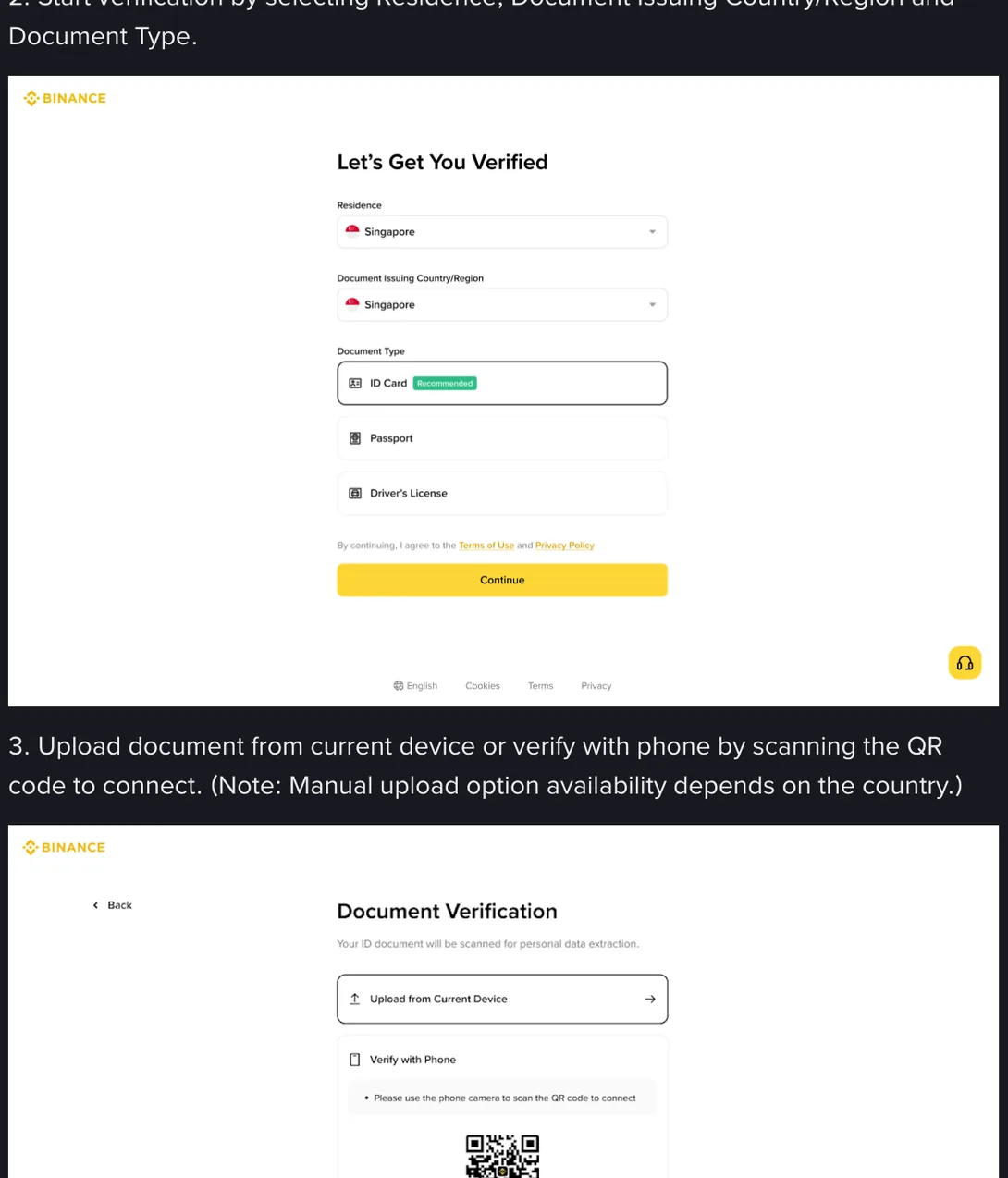
Upload from Current Device is the route to take if you are on a laptop with the files already on it, which is the situation where a phone-to-computer transfer pays off. Verify with Phone moves the rest of the flow to your handset by scanning a code, which is usually the simpler route, since the camera and the pictures are on the phone anyway.
The note attached to that step is easy to skim past: whether the manual upload option is available depends on your country. If your screen only offers the phone route, that is the flow you have been given rather than a fault to troubleshoot.
One practical difference between the two. Sending a picture from your phone to your computer through a chat app costs you image quality, because most of them recompress what you send. If the file is going to travel between devices, move it as a file, or shoot on the device you will upload from.
The last look before you press upload
Open the picture at full size and look at three places: the document number, the expiry line, and your photograph on the card. Those are the three the check leans on hardest, and they are the three that glare and softness reach first. If any of them makes you squint, shoot again. Another attempt costs two minutes; a rejected case costs a review cycle and the will to start over.
While you are on the expiry line, read the date rather than glancing at it. A document that has run out is not a photography problem, and the best light in the world will not get you round it.
Worth keeping the size of this in view. A well-shot card removes one common reason a case comes back. It has no effect at all on what the market does to money once the account is open, and that money can end at zero.
If you would rather have something check the file before it leaves your hands, this site has a small one. Drop the picture into the ID photo pre-flight check and it looks at six things in your own browser: File format, File size, Size and ratio, Brightness, Sharpness and Edge margins. Nothing is uploaded anywhere; the work happens on your machine and the file stays there. It cannot tell you whether a human reviewer will be satisfied, only whether the obvious mechanical problems are present.