Work through it in this order. If you can get the old account back, go back to using it. If you really don’t want the old account any more, close it and leave a gap before verifying a new one with the same ID. If the old account wasn’t opened by you, or you’ve tried everything and still can’t log in, go to Binance support.
What it means when Binance says your ID has already been used
Binance’s help centre has no page that explains this message on its own. What it does put in writing, in two places, is whether one person can have a second verified personal account.
The FAQ on Binance’s help page How to Complete Identity Verification for a Personal Account asks outright, “Can I have 2 personal accounts verified?” The answer offers a separate entity account, or the sub-account feature, which allows up to 5 sub-accounts under your personal account; a second verified personal account isn’t among the options. Clause 7.1 of the Terms of Use, on opening an account, adds that Binance reserves the right to refuse any account application without giving a reason, or to limit the number of Binance accounts you may hold.
Neither alternative helps the new account you’re stuck on. An entity account is for a company, entity or other organisation, and the same clause of the Terms treats it separately from a personal account. Sub-accounts sit under a personal account, so you first need that verified personal account, which is exactly the old one you’re trying to get back. Retaking the ID photo a few more times on the new account, or uploading it again in better light, won’t get it through either: the photo isn’t what’s blocking it. For the other reasons a verification gets sent back, Binance Verification Failed: 12 Reasons and Fixes works down twelve causes in order, and a document that’s already in use is item 12.
How to get back the old account that was verified with this ID
Who holds the old account, and whether you can still log in to it, decides where you go next. Find your row in the table below:
| Where the old account stands | Next step |
|---|---|
| You opened it yourself and still remember the email or phone number and the password | Log straight in to the old account, open the [Identification] page to see its current verification level, and use this account from now on |
| You remember the email or phone number from back then but have forgotten the password | Reset the password by following the help centre’s How to Reset Your Binance Account Password?, then log in |
| You noticed suspicious activity back then and disabled it yourself | Apply to unlock it by following the help centre’s How to Unlock My Binance Account? |
| You can’t remember which email or phone number you used | Go through the inboxes you used regularly at the time first; if that turns up nothing, contact support |
| You never opened one, and a family member or someone else has used your ID | Contact support and explain the situation |
Binance sends a notification when verification passes, and the app steps specify that it’s an email. Search the inboxes you used at the time for messages from Binance; the address where one turns up is the first to try for logging in and resetting the password. If you’ve changed phone numbers since, think back to which one you had in the years the account was opened.
Once the old account is back, leave the newly registered, unverified one alone and don’t send coins to it. An account that hasn’t completed Verified-level identity verification can’t deposit or trade in any case; What an Unverified Binance Account Can and Can’t Do sets out exactly which restrictions apply.
Verifying the new account with a family member’s ID, verifying another account with a different passport, or buying an already-verified account from someone else: each of these only makes things harder to untangle. The verification page states: “You cannot transfer your account to another person or substitute another person’s ID for your ID.” Clause 9.2 of the Terms of Use requires you to make sure that any Binance account registered in your name is not used by anyone other than you. With a different passport, the document changes but the person is the same, and you run into the same help-centre answer: for someone who already has a verified personal account, the routes on offer are an entity account or sub-accounts, not a second verified personal account. What follows from opening an account on a parent’s ID is checked against the terms clause by clause in Why You Can’t Open a Binance Account Before 18.
How to contact Binance support if the old account can’t be recovered
If you can’t log in to the old account and have no leads at all, or the account was never yours to begin with, it has to go to support. In the footer of Binance’s website, the Support column has 24/7 Chat Support; start the conversation from there.
Before you open the chat, have these to hand so you can explain the situation clearly:
- the original ID document you used for verification;
- the registered email or phone number of the new account;
- any old email addresses or phone numbers you can recall, and roughly which year the account was opened;
- if the account wasn’t opened by you, say in your first message that the account under this ID wasn’t registered by you, then explain whose hands the document has been in.
This list is there to help you state your case. Whatever support asks you to add, provide what it asks for. Clause 7.4 of the Terms of Use already provides that Binance may also ask you to submit additional information, supply extra records or documents, or meet a Binance representative in person.
Under clause 9.2, cited above, an account registered in your name may only be used by you; someone else trading on it is in itself at odds with the terms.
Should you disable or close the old Binance account?
Binance’s account security settings offer two actions, disable and close, and they differ widely in purpose and in consequences.
| Compared | Disable account | Close account |
|---|---|---|
| When to use it | You’ve noticed suspicious activity on the account and want to lock it to protect your assets | You don’t plan to use the account again |
| Can you go back? | Yes: apply to unlock it by following How to Unlock My Binance Account? | No: account closure is irreversible, and once the account is closed you can’t access it any more |
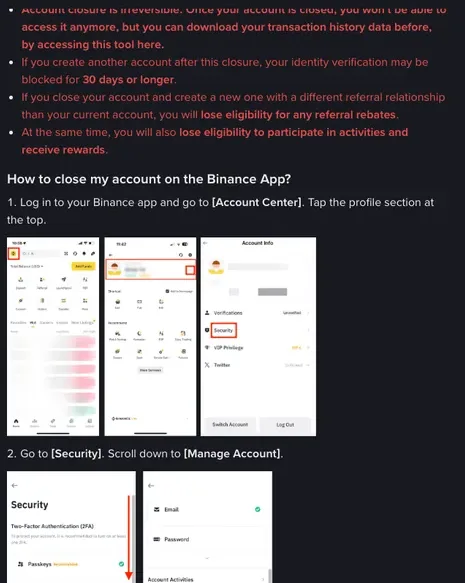
| In the app | [Account Info] - [Security] - [Manage Account] - [Disable Account] | [Account Center], tap the profile section at the top - [Security] - [Manage Account] - [Close Account] |
| On the website | Profile icon - [Account] - [Security] in the side menu - Account Management - Disable Account, click [Disable] | Profile icon - [Account] - [Security] on the left - [Account Management], click [Close] next to [Close Account] |
If you do decide to close, two things have to be done first. If the account still holds assets, withdraw them first: the closure page’s wording is that otherwise “these assets will be lost and cannot be recovered”. If you want to keep your transaction history, download it before closing with the tool the page links to. If the closure itself is blocked, the same page lists what can hold it up: more than 5 USD left in the account, open orders in Loan, a P2P order within 48 hours, Earn subscriptions, a Margin liability, assets in the Futures Account, active sub-accounts, or an active Web3 wallet. Clear whichever of these the page tells you is still outstanding, one at a time, then try again. After closure, Binance still retains certain sets of your personal data for a period, as required by laws such as anti-money-laundering and counter-terrorism-financing laws, and removes them once the mandatory retention period expires. Who looks at the ID documents you’ve handed over, and what you can ask Binance to do with them, is covered separately in Who Actually Sees Your ID When You Pass KYC.
How long after closing the old account can you verify with the same ID again?
Binance doesn’t give a fixed date. Among the notes on its help page for closing an account:
If you create another account after this closure, your identity verification may be blocked for 30 days or longer.
The wording is “may be blocked”, and “or longer” comes with no number attached. Don’t plan around day 31 as the day you’re let through, and don’t read the sentence as meaning you can verify a new account as soon as the old one is closed.
If the old account is already recovered and logs in normally, keeping it and carrying on is less trouble than closing it and waiting, and your transaction history and assets stay where they are. If you really do need to close it, mark the closure date in your calendar; if verification is still blocked once the 30 days are up, go back to “How to contact Binance support if the old account can’t be recovered” and take it to support.
What to submit if verification detects twins or multiple faces
One more kind of block has nothing to do with whether the ID has been used: the system detects multiple faces during identity verification, or detects twins. Binance’s help page How to Provide a Statement Video When Multiple Faces/Twins Were Detected in Your Identity Verification? says you may then be asked to submit ID document photos and a video statement to Customer Support, according to your account’s situation:
- multiple faces detected: front and back photos of all the ID documents used in the verification;
- twins detected: the front and back of your twin’s ID;
- in both cases, a video statement as well.
In the video, everyone involved in the verification has to appear, each holding up their own ID document and clearly reciting the set wording. The person being verified says: “Today is xx (day) of xx (month), xxxx (year). I, xxx (name), am applying to verify my Binance account for xxxx (email/phone number of the Binance account).” Everyone else says: “Today is xx (day) of xx (month), xxxx (year). I, xxx (name), am assisting xxx (the name of the person being verified) to apply to verify their Binance account for xxxx (email/phone number of the Binance account).” If you can’t speak English, you may record the video in any language.
Before you submit, go down the list: the picture isn’t blurry, the sound is clear and every face is clearly visible; no screen-recording software or filters were used; the video hasn’t been edited and carries no watermark; and everyone read out the statement and the related Binance account clearly. Why the face step itself fails is explained from the pass criteria up in Binance Face Verification Failed? Fix the Liveness Check.