The email arrives at some hour when you are in no state to argue with it. Verification failed. You open the app half awake and the screen says the same thing with nothing underneath it: no field named, no file named, no line item. That blank space is the actual problem, and it is what this page exists to fill.
One thing that sits outside the twelve, and it is the boring one. Nothing written here outranks your own screen. Which documents get demanded of you is a local answer, revised as the rules behind it are, which is why two readers in two countries can both do everything on this page correctly and get different results. Take it as one editor’s working list, not as counsel.
Twelve items follow, roughly in the order they are worth checking. You are not meant to read all of them. Find yours, change that one thing, submit again.
And one thing that is not among the twelve, said here rather than buried at the end. Passing this check opens a door; it does not make what is behind the door safe. Money you put into crypto can end up worth nothing at all, whichever of the twelve was yours.
What did the message actually tell you?
Binance does not tell you which field failed. What reaches you is a verdict already squeezed into one sentence, and the useful half, which item and by how much, is gone before it gets to your screen. So this is not a manual you look something up in. It is a list you eliminate down.
First make sure you were actually rejected: a case still in review and a case that has come back look similar on a phone, and if yours says under review then the waiting page is the one you want.
| Roughly what you were told | Where to start |
|---|---|
| Document could not be read, unclear, invalid | Items 3 to 6 |
| Information does not match your document | Items 1 and 2 |
| Proof of address does not meet the requirements | Items 7 to 10 |
| Face verification failed, or the recording kept restarting | Item 11 |
| This document is already in use | Item 12 |
| Nothing at all, just not verified | Item 1, then work down |
Names, dates and the boxes above them
This group comes first because the fix costs nothing but attention, and because a name first written in another script has more than one Latin spelling to get wrong. Nothing is wrong with your documents. Two strings of characters simply did not match: the one you typed, and the one a machine read off your ID.
1. The name or date of birth does not match the document, character for character
Your name exists in more than one alphabet, and the Latin version of it is not fixed. Urdu, Arabic, Devanagari, Sinhala and Amharic all transliterate several ways, and you have probably used two or three of them in your life: Mohammad on the CNIC, Mohammed on the airline booking, Muhammad on the university certificate. The form does not know they are the same person. Type the Latin spelling exactly as it is printed on the document you are about to upload, even if you dislike that spelling.
Then the shape of the name. Plenty of names in South India are a given name with a father’s initial in front of it, like S. Kumar; plenty of Indonesian and Sri Lankan names are a single word with no family name at all; Arabic names run to four parts with bin or ibn holding them together. The screen wants First Name, Middle Names and Last Name, which is a European shape. If you are working from a passport, use the passport’s own answer: the data page has separate Surname and Given names lines and whatever it prints there is what the checker reads. If the surname line is blank on your passport, do not invent one to fill the box.
Dates cause the quiet version of the same failure. Documents across India, Pakistan and Kenya usually print day first; the confirm screen asks for year, month and day in separate selectors. A birthday on 05/09 goes in as the ninth of May, everything else on the form is perfect, and the case comes back saying your information does not match.
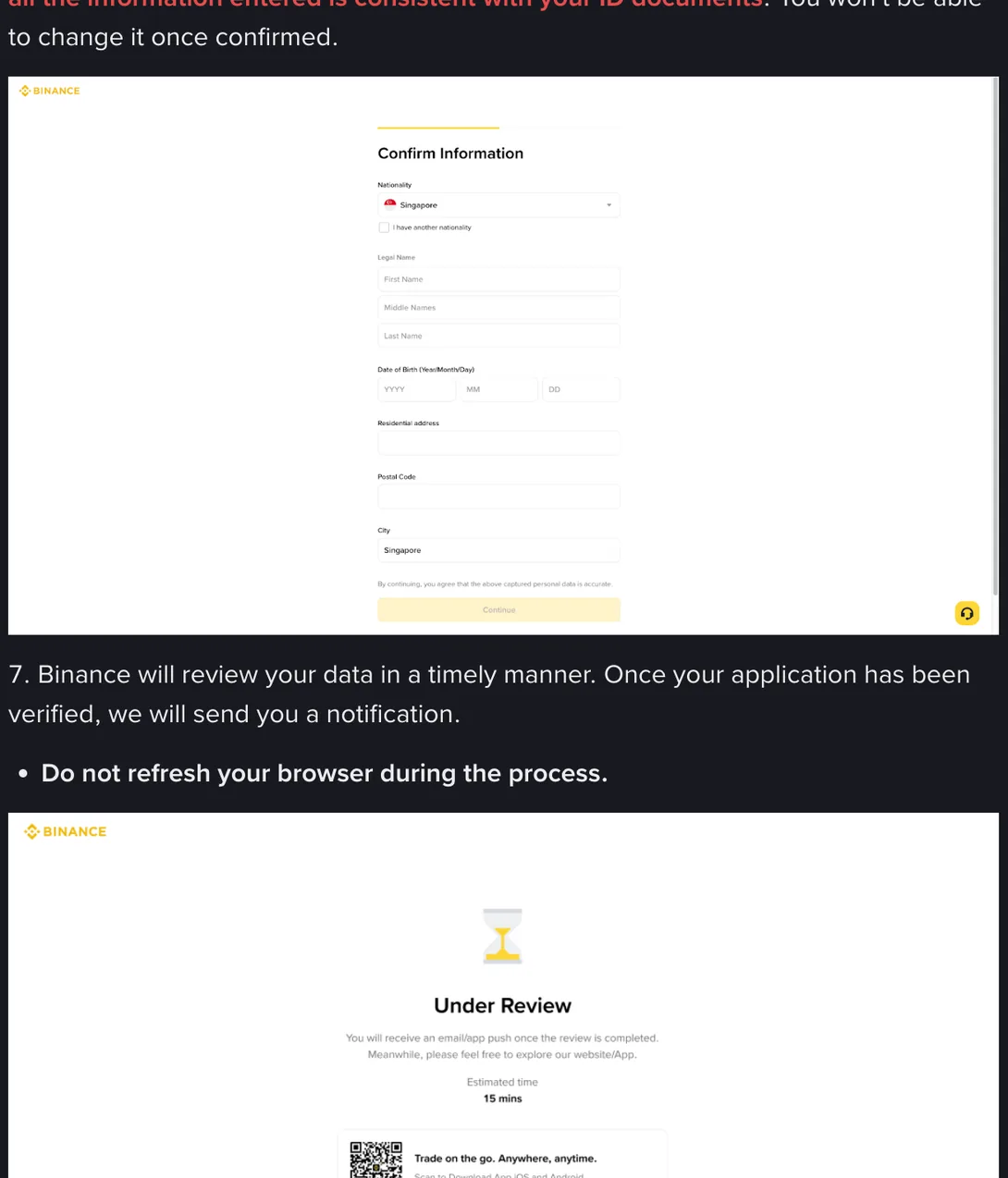
2. Residence, issuing country and nationality do not agree
The flow asks for your residence and the country that issued your document in two separate dropdowns, because they can genuinely differ: a Pakistani on a CNIC working in Doha, a South African living in Nairobi, an Indian student in Melbourne. Residence means where you live now. Issuing country means what is printed on the document. Nationality is a third thing again, with its own checkbox for people who hold two.
Setting all three to the same value out of habit does not always fail loudly; sometimes it just puts you into a document list that cannot match what you are holding. And if the date of birth you entered makes you a minor, nothing else on the form matters.
The ID document itself
The tell for this group is that reshooting changes nothing. Same message, fourth attempt, different light. When that happens, stop reshooting and look at the document and the file rather than the photograph.
3. The document type is not the one your country’s flow accepts
The type screen offers three options, ID Card, Passport and Driver’s License, with ID Card carrying a Recommended tag. What sits behind each option depends on the issuing country you chose one field earlier, which is why the fix is always to set the country first and then look at what remains. Australians have no national ID card and normally end up on passport or driving licence. In Pakistan the CNIC is the ID card. South Africans need the Smart ID card; the green barcoded book that preceded it will not stand in for one. If you are in India and hold several possible documents, check which ones the flow lists under the option you picked before you upload any of them.
4. The document is expired or damaged
Validity is measured on the day you submit, not the day you photographed anything. Check the expiry line before you do anything else. There is no workaround for an expired document: renew it, or switch to another type. Damage counts too, in the literal sense of a torn corner, a fold across the number, or lamination that has bubbled over a line of text.
If your document expires within a few months, deal with that now rather than mid-flow. What happens to an account when the document behind it lapses is its own subject.
5. Glare, a cropped corner, a missing edge
Laminated cards throw a white band under any overhead light, your eye edits it out and the checker does not. When that band lands across the ID number or the date of birth, those characters stop existing. Flash pointed straight at the laminate produces exactly that band; a lamp too close does the opposite damage, burning the printing away into a bright patch that looks sharp to you and reads as empty.
Then framing. All four corners plus the border need to be inside the frame with a little space around them. If you are told your file is incomplete, do not respond by shooting the card bigger; that is the wrong direction. Take the card out of its plastic sleeve, put it on a dark matte surface, switch off HDR and auto-enhance, and shoot from directly above. Nothing else: no crop, no filter, no watermark.
6. It is a copy, a scan, or a photo of a screen
A photocopy, a scanner output, a picture of your laptop display and a two-year-old image from your gallery are all second-generation files, and they carry the evidence of that: the fine grid of a screen, the halftone dots of print, the shadow along a fold. Binance does not publish a rule about checking for those signatures, so do not count on them being missed. Photograph the physical document itself, now, on a flat surface.
The address document
Address proof takes more preparing than the ID does, because a passport is a passport everywhere while a bill is a local object with local rules. Binance folds both lists into its residential address help page, under the second and third questions. They are collapsed by default; click them open before you argue with anyone about what counts.
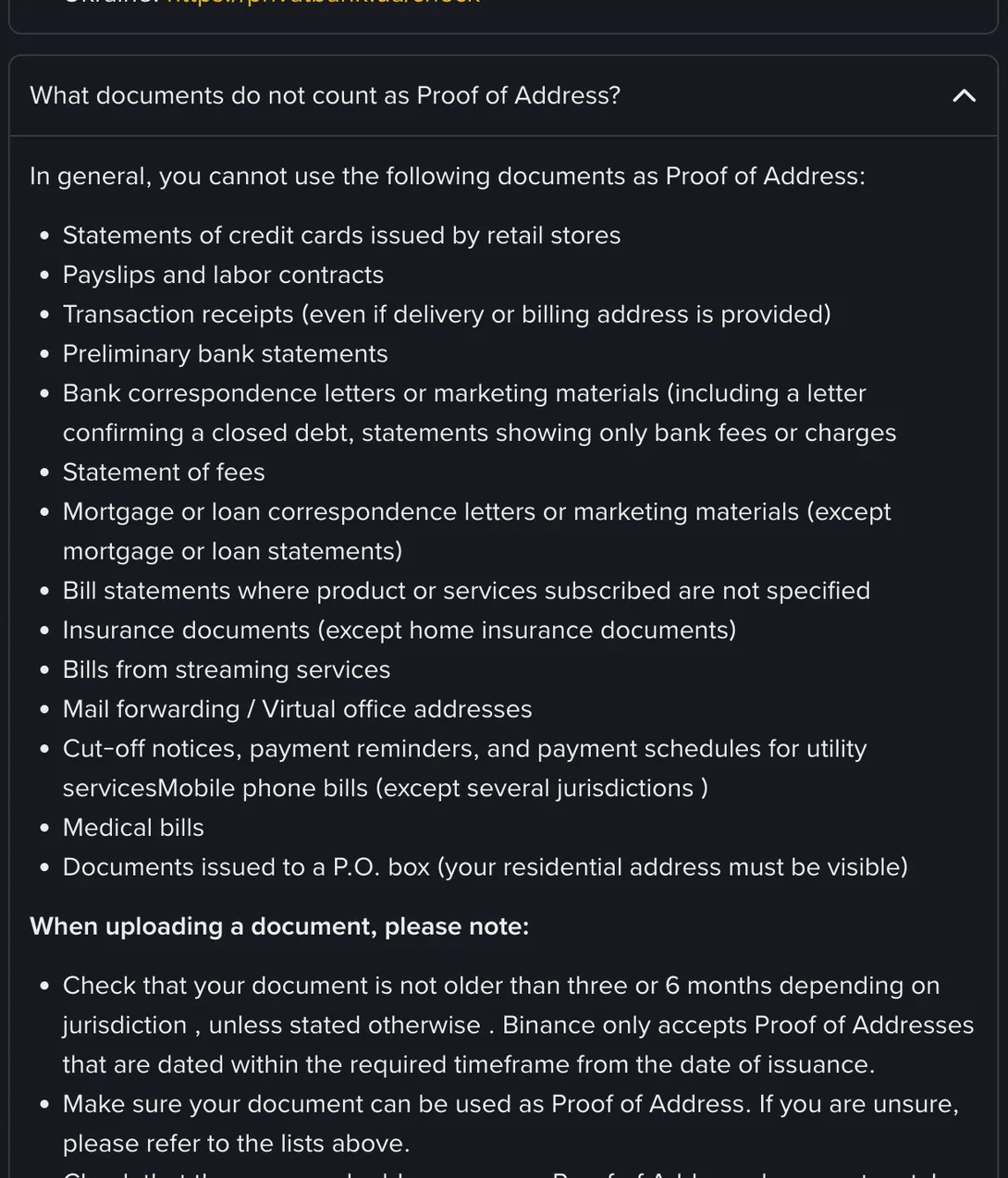
7. The document is older than your jurisdiction allows
At the bottom of that same list, under the note about uploading, the page tells you to check that your document is not older than three or 6 months depending on jurisdiction, unless stated otherwise. The per-country table is stricter than that sentence suggests, and it is folded into the first question on the page rather than the third. Reading it in September 2026, these are the rows that matter for this site’s readers:
| Where you live | Document must be no older than |
|---|---|
| India | 2 months |
| Australia | 3 months |
| South Africa | 3 months, listed inside the Binance BH/GCC row |
| Pakistan, Kenya, Ghana, Sri Lanka | 6 months, the default for countries not named |
Two months is tight. If you are in India, download the statement the week you need it, not the one you saved in spring. And what gets measured is the issue date the bank printed on it, not the day you saved the file.
8. The document is not in your name
The bill is in your father’s name, or your landlord’s, or the roommate who set up the broadband. It proves that person lives there. Attaching a signed letter from them does not fix it, because the reviewer is looking for one document carrying your full name, this address, an issue date and an issuer, and a letter from your roommate has no issuer. This situation has a page of its own: the answer is to get one thing moved into your name, such as a bank statement.
9. It is a kind of document that is never accepted
The third question is a list of things that will come back no matter how recent and how clearly printed they are. The ones worth checking your file against first: mobile phone bills, which the page marks as not accepted except in several jurisdictions; payslips and labour contracts; transaction receipts, even where a delivery or billing address is shown; insurance documents other than home insurance; statements of fees; anything issued to a P.O. box, since your residential address has to be visible; and virtual office or mail forwarding addresses.
The mobile bill is the painful one, because it may be the only bill you have ever had in your own name. A landline, broadband or TV package bill is on the acceptable side of the same list; a mobile bill usually is not. If you have neither, a bank statement or a stamped address confirmation letter from your bank is the shorter road.
10. The file has been edited, cropped or rebuilt
Cropping out the bank’s logo for privacy, flattening a statement in an image editor, exporting it through a converter, adding a watermark, blacking out an account number: each of those turns an original document into something that has been through your hands. The next section is about why that matters more than it looks like it should.
Why a bought or edited bill gets caught
You look at a PDF and see a layout. A checker gets a file, and a file carries more than the picture it shows.
There is a text layer. A statement downloaded from a bank or an operator has selectable characters underneath the page image, so the name and address exist as text. Documents assembled from a template usually fail one way or the other: either the whole page is one flat image with nothing selectable, or the text layer disagrees with the picture, showing one house number on screen and a different one when you copy it out.
There is the file’s own record of itself: when it was created, when it was modified, what software produced it. Nobody has to look at that by hand. A statement generated by a bank’s system and a page exported from an image editor do not look alike at that level.
And there is comparison. Checking a new file against ones seen before is cheap, and a template sold a few hundred times produces a few hundred documents with identical spacing and the same small misalignment in the same place. Which platforms do this, and how far they take it, is not something any of them publish. What Binance publishes in the note under that rejected list is narrower: which documents it will not take, and how recent yours has to be.
The consequence is what matters. A blurry photo is a resubmit. A document judged to have been fabricated is not in the same category, and no help page will promise you a way back from it. There is also somebody else in this: the address printed on a document sold online can be a real home belonging to someone who never agreed to any of it.
Your face, and a document that is already in use
11. The liveness step never produced usable footage
Failing here does not mean you were taken for someone else. The step does not ask whether you resemble your photo before it asks whether the recording it captured is usable at all, and on an older Android phone, on hotel wifi, or sitting with a window behind you, it may not be. Backlight is the first thing to rule out. Everything specific about this step, including which browser to do it in and what to change first, is on the liveness page.
12. That document has already verified another account
One document, one verified personal account is standard practice on this kind of platform. If the message says your document is already in use, the useful move is to work out who holds the older account, which may well be you, from an email address or a phone number you used years ago. Try account recovery on those first. Opening a second account and verifying it with the same document is not a route around this; that is the exact thing the check exists to catch.
Read it off the document, not off your memory
Put the document you uploaded flat on the desk next to your keyboard, open the form, and read your name off the document one character at a time, out loud if that helps. Then the date of birth, then the number itself. O and 0, I and 1, S and 5 are the three collisions that do the damage, and reading aloud is what catches them. Do this from the document every single time, never from memory, because familiarity with your own name and passport number is precisely where the missing character hides.
Then fix every error you have confirmed against the document before you resubmit. Where you are only unsure, change one thing at a time, so that if it comes back again you will know what it was not. The pacing of second and third attempts, and what changes about a case after the first rejection, is the next page along.
One line in a notebook is what makes that possible: the date, the item you changed, and the wording that came back. Three attempts with a record behind them get further than ten without one.